Audio
Levels
Overview
Control game, chat and music from your Stream Deck +. Turn to adjust, press to mute, and let chat take priority. Windows only.
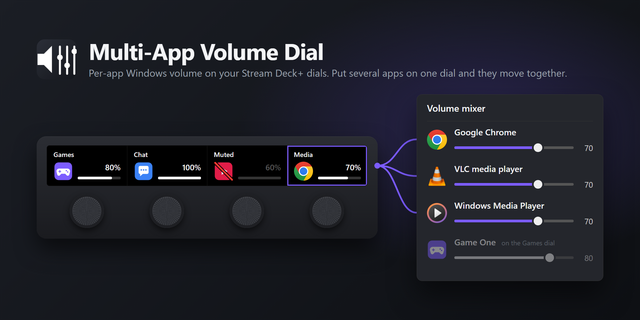
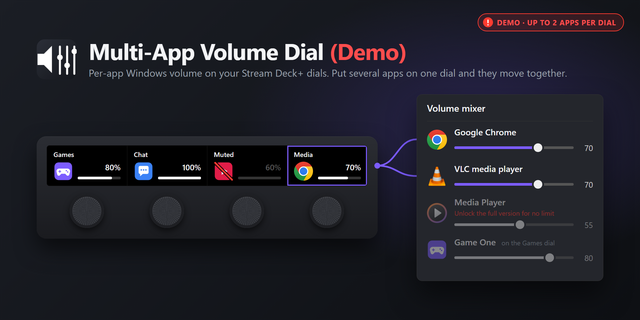
Adjust your mix without leaving your game. Levels puts Game, Chat, Media and Master on the four Stream Deck + dials. Turn to change the volume, press to mute, and read the level and app name on the touch strip.
Need to adjust just one app? Tap the Game, Chat or Media strip to cycle through the apps in that channel. The dial then controls the selected app. You can also assign a dial to Mic to control your microphone level.
Levels detects supported games as they start and remembers the Game level you used for each one. Turn on Chat first to lower game and media audio while someone speaks. Choose how much they step down; the volume returns when the conversation pauses. Media first lets music or video take priority over your game instead.
Set a maximum volume for a channel, switch outputs from a key, or recall a saved mix. The included Levels profile brings the mixer, saved mixes and outputs together across three pages.
Levels works with Windows audio without adding virtual audio cables or requiring an account. If you already use SteelSeries Sonar, the dials control its channels.
Ten styles are included as a setting (Style). Levels Soundboard, an expansion, is sold separately. Free updates are included.
Windows only. Requires Stream Deck + and Stream Deck app 7.1 or later. Levels controls app volumes; it does not route individual apps to different output devices.
Features
Four default dial assignments: Game, Chat, Media and Master; reassign a dial to Mic when needed
Turn for 2% volume steps; hold and turn for fine 1% steps; press to mute or restore the channel
Live touch strip with volume, mute state and app names
Adjust individual apps from the Game, Chat and Media touch strips
Automatic detection of supported games and remembered Game volume for each game
Chat first and Media first priority modes, with adjustable volume reduction
Per-channel maximum volume
Mic mute, Mute all, saved mixes and output switching on keys
Included three-page Levels profile and ten built-in styles
SteelSeries Sonar channel control; no account required
Stream Deck® and Elgato® are registered trademarks of Corsair Memory, Inc. All other product and software names belong to their respective owners and are used only to identify the products Levels works with. Frenetiq Design is an independent maker, not affiliated with, endorsed by or sponsored by Corsair, Elgato, SteelSeries or any other company named here.
What's new in Levels 1.1
A new settings panel. Every Levels dial and key now opens a clean, step-by-step panel with a live preview at the top: change a style, a channel or a limit and see the dial or key update right away.
Hold to reset. Hold a dial for a moment and the channel returns to its reset level. Set that level for each dial (it never goes above your Max volume). A short press still mutes.
Choose which styles you see. The Style list shows the styles you keep in your menu. Tap Edit list to tick or untick any style; at least one always stays.
Cleaner navigation keys. The page keys in every included style are now plain and tidy, without arrows.
A new Levels icon in the Stream Deck action list.
Version 1.1
Nov 5, 2026
Details
Type
Audio
OS
Windows
Compatibility
Stream Deck 7.1 or later
Size
33.47 MB
Version
1.1
Language
English
Support
Neo Infobar support
No
Profiles
Yes
Dial support
Yes
Additional links
You might also like