Development
ACCESS
Overview
ACCESS keeps a local library of SSH, RDP, web and custom connections, launches the clients you already use, groups machines by environment and customer, and shows session state only when a client can positively verify it. Production profiles confirm with a hold.
VERIFIED, OR NOT CLAIMED — With OpenSSH's control socket a session is verified, with its duration; without it, ACCESS shows a launch, not a connection.
PRODUCTION WITH CARE — Environments carry their names and colours; production can require a deliberate hold to open or disconnect.
HEALTH ON ITS OWN — TCP or HTTPS reachability per machine, kept apart from session state: an open port is not a login.
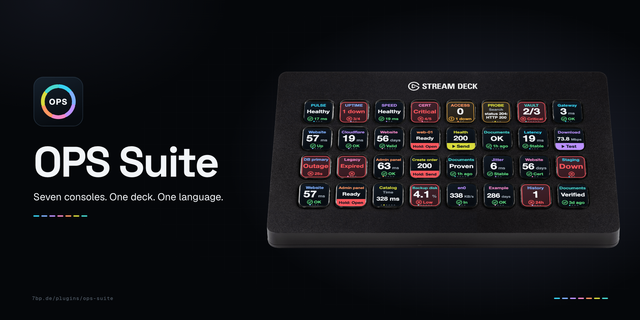
Part of the OPS family: seven operations consoles with one design. On a Stream Deck Neo, its Infobar shows what is happening, or the verdict. Uses the clients you have: Terminal or iTerm with OpenSSH, an RDP app, your browser. No credentials are stored; keys and passwords stay with SSH and your apps. macOS 12+, Stream Deck 7.6+. Local only: no account, cloud service, telemetry or subscription.
ACCESS 1.1.0
Keys you can read without leaning in: one big number or word, with the facts a tap away. A solid strip with a verb marks a key that does something; every other key watches: tap for the next fact, hold to check now. Group and Recent are now choices of the Switcher; Session Watch stays on the keys that have it and Connect does its job for new ones. A key's strip says when it needs a hold. Nothing about launching changed: production and disconnecting still need a deliberate hold. Keys already on your deck keep working.
Uses the clients you have: Terminal or iTerm with OpenSSH, an RDP app, your browser. No credentials are stored; keys and passwords stay with SSH and your apps.
Version 1.1
Nov 2, 2026
Details
Type
Development
Monitoring
Utilities
OS
Mac
Compatibility
Stream Deck 7.6 or later
Size
300.88 KB
Version
1.1
Language
English
Support
Profiles
No
Dial support
No
Neo Infobar support
Yes
You might also like