Video
Adobe Premiere Pro Shortcut Profile
by Adx.cool
Overview
The complete Adobe Premiere Pro keyboard shortcut pack for Stream Deck.
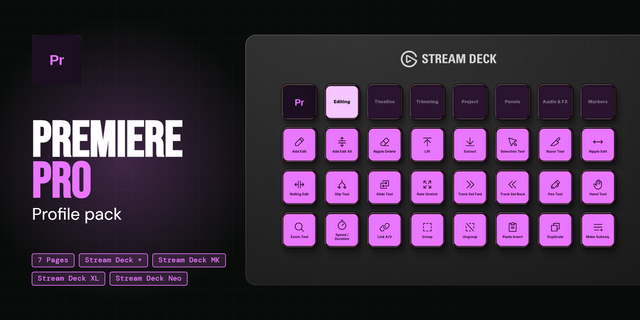
144 shortcuts across 16 categories — organized, scored by importance, and ready to install on Stream Deck Classic / MK.2, XL. Stop memorizing key combos. One tap, one action.
What's included:
• Editing (22): Insert, Overwrite, Lift, Extract, Add Edit, and 17 more • Project (20): Save, Save As, Save a Copy, New Project, New Sequence, and 15 more • Nudge (12): Nudge Object Up, Nudge Object Down, Nudge Object Left, Nudge Object Right, Nudge Object Up x5, and 7 more • Clips (11): Speed / Dur., Audio Gain, Audio Channels, Link / Unlink, Group, and 6 more • Graphics (11): Rectangle, Ellipse, Bring to Front, Bring Forward, Send Backward, and 6 more • Workspaces (10): All Panels, Assembly, Audio WS, Captions WS, Color WS, and 5 more • Panels (10): Project, Source Mon., Timeline, Program Mon., Effect Ctrl, and 5 more • Playback (9): Play / Stop, Step Back, Step Forward, Zoom In, Zoom Out, and 4 more • Marks (9): Mark In, Mark Out, Mark Clip, Mark Selection, Go to In, and 4 more • Slip & Slide (8): Slide Left, Slide Right, Slide L x5, Slide R x5, Slip Left, and 3 more • Tracks (7): Snap, Video H +, Video H -, Audio H +, Audio H -, and 2 more • Markers (5): Add Marker, Next Marker, Prev Marker, Clear Marker, Clear All Mks • Captions (4): New Cap Track, Add Caption, Next Segment, Prev Segment • Transitions (3): Video Trans., Audio Trans., Default Trans • Workflows (2): Add Edit + Ripple Delete, Save + Export • Help (1): Premiere Pro Help
Features: • 144 shortcuts across 16 folders, every binding checked against Adobe's own Premiere Pro shortcut table — both the Windows and the macOS column, so no key is a mac shortcut guessed for Windows • The nudge keys now say which nudge they are. The eight that shipped before move a selected GRAPHIC, not the clip — they are labelled Object now, and the real clip nudge is here too, ±1 and ±5 frames • Platform divergence handled where Adobe actually diverges: the clip nudge is Cmd+arrow on macOS and Alt+arrow on Windows, Trim Edit is Cmd+T against Shift+T, and the whole Markers clear set differs • All ten workspaces and all nine panels on single keys, plus the Project panel's own view controls — list, icon, thumbnail size, hover scrub, toggle view • The three-point edit one tap each — mark in, mark out, insert, overwrite, lift, extract — with slip and slide at one and five frames in both directions • Captions, Graphics and Titles, and the Effects panel included, not just the timeline • Import from Media Browser is now called that. It was labelled Media Browser, which is the panel, and the panel is a different key
Install: double-click any .streamDeckProfile to import. The App binding is pre-filled to Adobe Premiere Pro — auto-activates on focus. If it didn't pre-fill, set it manually under Stream Deck → Preferences → Profiles → App.
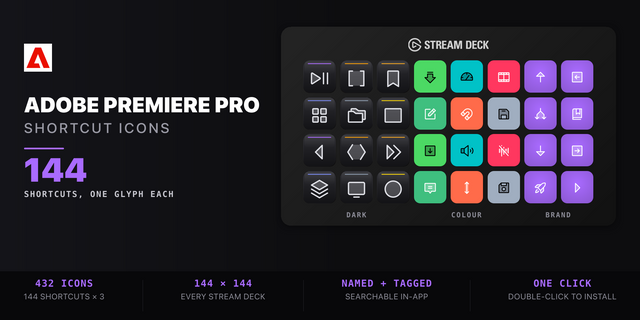
Also included: the 432-icon Adobe Premiere Pro icon pack (144 icons in 3 finishes), as a .streamDeckIconPack you can install with a double-click. Every key in this profile, available to drop on any action you like.
Try it first: press the keys of this profile in your browser, no install — https://streamdeck.adx.cool/try/adobe-premiere-pro/
Learn more about Adobe Premiere Pro: https://www.adobe.com/products/premiere.html
v3.0 — a correctness pass on all 128 keys, plus 16
Every binding v2 shipped was diffed against Adobe's current shortcut table. All 128 are still correct, including every place Windows and macOS diverge. Two names were not.
The Nudge folder moved a selected GRAPHIC, not the clip — eight keys renamed to Nudge Object, and the real clip nudge added (±1 and ±5 frames). On Windows the clip nudge is Alt+arrow, not Ctrl.
"Media Browser" was actually Import from Media Browser. The Media Browser panel is a different key and was already correct.
16 documented keys added: Clear, Delete with Options, the Text tool, Snap in Program Monitor, New Custom Bin, Keyboard Shortcuts, and the Project panel's view controls.
Fixed a glyph that pointed the wrong way: "Nudge Down x5" shipped a right arrow.
Re-sourced from Adobe's relocated reference page; the old URL now redirects.
Version 3
Sep 14, 2026
Details
Type
Video
Device
Stream Deck Mini
Stream Deck MK
Stream Deck Neo
Stream Deck XL
OS
macOS
Windows
Compatibility
Stream Deck 6.4 or later
Size
14.47 MB
Version
3
Language
English
Support
Icons
Yes
Additional links
You might also like