Monitoring
ADS-B Plane Radar
Overview
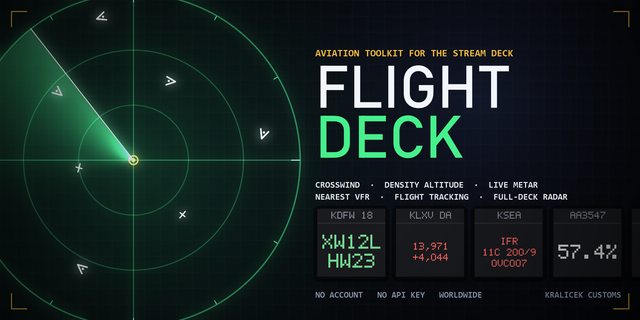
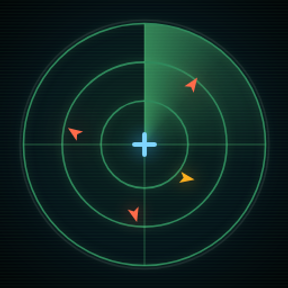
Turn your entire Stream Deck into a single, live air-traffic radar screen.
ADS-B Plane Radar spreads one continuous radar display across all 15 keys, tracking real aircraft near your location in real time — no receiver, no extra hardware, no subscription required.
FEATURES
- Live aircraft tracking from free, keyless community ADS-B data (airplanes.live, adsb.lol, adsb.fi), with automatic fallback if one source is temporarily unavailable
- Address search with autocomplete — type a city or street, no coordinates needed
- 6 color schemes (Classic, Amber, Ice, Crimson, Monochrome, or fully custom), 6 aircraft icon styles including a military-style speed vector, and 10 label fonts
- Choice of background: classic radar rings, a muted world coastline map, or a real muted OpenStreetMap street map
- Up to 3 lines of configurable per-aircraft info: callsign, altitude, speed, type, registration, squawk, heading, distance, climb/descent rate
- Short-press any radar key to cycle range, long-press for an instant refresh
- Built-in debug panel showing exactly what the plugin is doing if anything looks off
- Fully localized: English and German, with automatic fallback for other languages
Perfect for aviation enthusiasts, pilots, plane spotters, or anyone who wants a genuinely unique, always-on ambient display on their Stream Deck.
PRIVACY NOTE
Your configured location is sent to the ADS-B data provider you choose (to fetch nearby traffic), to Komoot's Photon geocoder (only when using the address search), and to OpenStreetMap (only if you pick the street-map background). No other personal data is collected or transmitted, and there's no telemetry back to the plugin author.
ADS-B Plane Radar 1.1.0.0 – Release Notes
New
Route and airline on your labels. The extra label lines can now show the route (e.g. VIE-LHR) and the airline name (e.g. "Austrian Airlines"). These come from open data bundled with the plugin, so no extra requests are made. The route is only shown for scheduled flights with a known flight number.
A fourth label line. You can now configure up to three extra lines below the callsign instead of two.
Flight tracking. Enter a flight number (LH400) or a callsign (DLH400) and that flight is highlighted on the radar and always labelled, with its distance. If it is outside your radar range, it appears at the edge of the radar.
Aircraft-type icons. A new icon style shows different shapes for airliners, light aircraft, helicopters, gliders and ground vehicles.
Units. Choose altitude in flight level/feet, feet or meters, and speed in knots, mph or km/h.
Location by IP. A new button sets your approximate location with one click. It only runs when you press it.
Privacy
Flight tracking sends the callsign you enter to your selected ADS-B data provider.
The location button sends your IP address once, when pressed, to ipwho.is.
Route and airline lookups happen offline and send nothing.
Notes
The plugin package is about 3 MB larger because of the bundled route and airline data.
The default radar behaviour, key presses and all existing settings are unchanged, so existing setups keep working as they are.
Version 1.1
Oct 13, 2026
Details
Type
Monitoring
OS
Windows
Compatibility
Stream Deck 6.9 or later
Size
18.65 MB
Version
1.1
Language
English
German
Support
Dial support
No
Neo Infobar support
No
Profiles
Yes
You might also like