Development
AI Agent Status
by Adx.cool
Overview
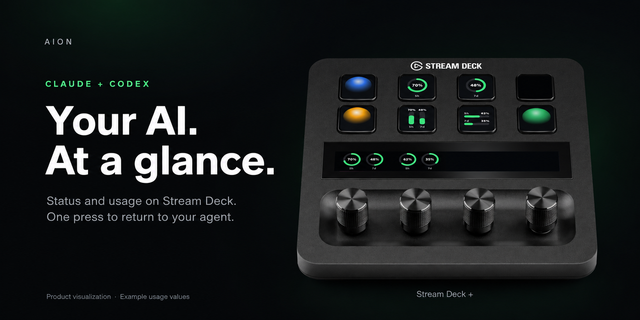
You gave Claude Code a long job and went to make coffee. Is it still running? Did it finish four minutes ago? Is it sitting on a permission prompt you never saw? AI Agent Status puts the answer on a key, for Claude Code and Codex.
Version 2 is a full redesign: Claude Code now shows all five states, a new look, two new actions and a dial that steps through your sessions.
Five states, both agents • Working, Ready, Needs you, Failed, Offline: one word, one colour and one mark, never colour alone. • The key's background says which agent; the clock says how long it has been in that state. • Codex works on install: it records every state in its own session files. • Claude Code: Working, Ready and Offline on install. Needs you and Failed come from a free hooks plugin that ships inside this one. Open any key's settings: two commands to copy into Claude Code, and a light that turns green when the hooks are detected.
5 actions • Agent Status: state, time in state, project. • Needs You: dim while nothing waits, lit the moment an agent waits on a permission prompt or a turn fails. Built for the corner of your eye. • Activity: the clock first. "Working for 11:04" says the run is long; "Needs you for 4:12" says you missed a prompt. • Overview (new): every live session on one key, most urgent first. • Sessions (new): one session at a time. Press the key, or rotate the dial, to step through them.
Dials (Stream Deck +, + XL, Galleon 100 SD) Agent Status, Needs You, Activity and Sessions also run on dials. Side by side, they draw one continuous screen across the touch strip. Rotate to switch agent, or to step through sessions.
Several terminals, several projects • Scope a key to Claude Code, to Codex, to one project folder, or to whichever session needs you first. • Failed beats Needs you beats Working beats Ready, so a key never hides the session that matters.
Private by design • No network, no account, no API key. It reads the session files your agents keep on this computer: the state, a time and the project folder's name. Never your prompts, code or transcripts. • It never edits Claude Code's or Codex's settings. The hooks plugin is installed by you, with Claude Code's own /plugin command, and removed the same way.
Also • Dark and light themes, key by key. • One read for the whole deck, however many keys. • Upgrading from 1.x: your keys keep their settings and switch to the new look on their own.
Requires Stream Deck 7.1 or later, on macOS 10.15+ or Windows 10+. Claude Code's hooks need Node.js on your PATH.
Not affiliated with Anthropic or OpenAI.
More from ADX: https://streamdeck.adx.cool · https://marketplace.elgato.com/@adxcool
v2.0 — Claude Code gets all five states. Needs you and Failed now work on Claude Code too, through free hooks that ship inside the plugin: open any key's settings, copy two commands into Claude Code, and a light turns green when they are detected. Codex still needs nothing.
NEW • A full redesign: the key's background is the agent, the colour and mark are the state, the clock says how long. Dark and light. • Overview: every live session on one key. • Sessions: one session at a time, on a key or a dial. • Dials side by side draw one continuous screen across the touch strip.
FIXED • After you pressed Esc on Claude Code, a key could read Working for up to a day. It now goes back to Ready. • The whole deck reads your session files once, not once per key.
Your 1.x keys keep working with the same settings, and switch to the new look on their own.
Requires Stream Deck 7.1 or later.
Version 2
Nov 11, 2026
Details
Type
Development
Monitoring
OS
Mac
Windows
Compatibility
Stream Deck 7.1 or later
Size
310.23 KB
Version
2
Language
English
French
Support
Neo Infobar support
No
Profiles
No
Dial support
Yes
You might also like