Monitoring
AI Usage Monitor
Overview
Temporary notice: OpenAI is currently providing weekly usage limits only on PRO Plans. The 5-hour limit tiles will display as “Unavailable” until OpenAI restores this limit. This does not impact PLUS or FREE Plans.
AI Usage Monitor
Stop guessing how much Codex you have left.
See your 5-hour session and weekly usage limits directly on your Stream Deck keys - so you always know when to push forward and when to slow down, without leaving your editor.
No dashboards. No browser tabs. No surprise rate limits.
Why developers install it
Never get throttled mid-task See exactly how much usage you have left before sending your next prompt.
Zero setup Works instantly with your existing Codex CLI login - no extra configuration required.
Built for real hardware Designed specifically for Stream Deck keys: clear, readable, and glanceable.
Private by default Everything runs locally. No telemetry, no analytics, no third-party services.
Three actions, one plugin
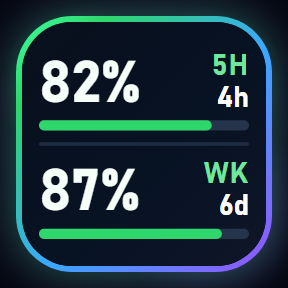
Codex Overview Both 5-hour and weekly usage on a single key.
Codex Session Focused view of your current 5-hour window.
Codex Weekly Focused view of your weekly allowance.
Built for power users
Multiple display styles: Minimal, Gauge, and Fill
Show remaining or used values
Tap any key to refresh instantly
Keeps the last known value if a refresh fails
Clean, readable layouts designed for small keys
Works on Windows 10+ and macOS 12+
Perfect for
Codex CLI users working in long coding sessions
Teams managing shared usage limits
Developers who want a constant, glanceable signal
Setup
Sign in to Codex CLI
Install the plugin
Add a key
Done.
Privacy & Security
Uses your existing local Codex session
Communicates only with official Codex endpoints
No data leaves your machine
Support
Questions, feedback, or feature requests: plugins@joshbc.com
Keep your flow. Keep your context. Keep coding.
New: Claude support
Your Claude Pro or Max usage now shows on Stream Deck, right next to Codex.
Claude Session: your 5-hour usage window
Claude Weekly: your weekly limit
These are the same numbers as /usage in Claude Code.
Setup: install Claude Code and sign in once by running "claude", then add a Claude key. The Claude desktop app's copy of Claude Code works too.
Privacy: the plugin never reads your Claude credentials. It asks your installed Claude Code for your usage, so checking uses none of your quota.
Key states: SET UP means Claude Code wasn't found. SIGN IN means it isn't signed in to a Claude plan.
Improved
Provider logos on every key: the Claude mark on Claude keys, the OpenAI mark on Codex keys
Bigger logos, and the STALE and SYNC badges no longer cover them
Fixed
Codex keys sometimes showed SIGN IN while you were still signed in
Weekly-only Codex accounts now show the weekly limit correctly
Questions? plugins@joshbc.com
Version 1.1.6
Oct 9, 2026
Details
Type
Monitoring
OS
Mac
Windows
Compatibility
Stream Deck 7.1 or later
Size
667.21 KB
Version
1.1.6
Language
English
Support
Neo Infobar support
No
Profiles
No
Dial support
No
You might also like