Gaming
Anno 117: Pax Romana Shortcut Profile + Icon Pack
by Adx.cool
Overview
The complete Anno 117: Pax Romana keyboard shortcut pack for Stream Deck.
72 shortcuts across 8 categories — organized, scored by importance, and ready to install on Stream Deck Neo, Classic / MK.2, XL. Stop memorizing key combos. One tap, one action.
What's included:
• Build (17): Construction Menu, Build Street, Build Paved Road, Build Residence, Build Warehouse, and 12 more • Camera (13): Rotate Camera Left, Rotate Camera Right, Zoom Camera In, Zoom Camera Out, Reset Camera Position, and 8 more • Groups (10): Select Group 1, Select Group 2, Select Group 3, Select Group 4, Select Group 5, and 5 more • Menus (8): Open Trade Routes Menu, Open Research Menu, Open Religion Menu, Open Diplomacy Menu, Open Island Storage, and 3 more • Time & Interface (8): Pause Game, Increase Game Speed, Decrease Game Speed, Toggle Infolayer Visibility, Toggle Lock InfoTip, and 3 more • Navigation (7): Go to Latium, Go to Albion, Jump to Next Selection, Jump to Selection, Select Next Ship, and 2 more • Upgrade (6): Upgrade Tool, Mass Upgrade, Regional Residence Upgrade, Regional Mass Upgrade, Roman Residence Upgrade, and 1 more • Help (3): Official Support, Anno Union Devblog, Steam Community
Features: • 72 Anno 117: Pax Romana shortcuts in 8 folders — Build (17), Camera (13), Groups (10), Menus (8), Time & Interface (8) • Transcribed from the game's own Options → Controls screen, not from a hotkey blog — the published guides get game speed and the upgrade keys wrong • The whole build bar on one page: street, paved road, residence, warehouse, farmfield, plus the move, copy, demolish and planning tools • Six camera presets on six keys — F5 to F10 recall a saved viewpoint, which is the thing a deck does better than a keyboard • Ten selection groups, and one-tap jumps to Latium and Albion • All four upgrade paths, which no guide lists together: the generic tool, mass upgrade, and the Regional and Roman residence upgrades • Smart Profile auto-switch pre-bound to Anno117.exe, plus a Help folder opening Ubisoft support, the Anno Union devblog and the Steam community
Install: double-click any .streamDeckProfile to import. The App binding is pre-filled to Anno 117: Pax Romana — auto-activates on focus. If it didn't pre-fill, set it manually under Stream Deck → Preferences → Profiles → App.
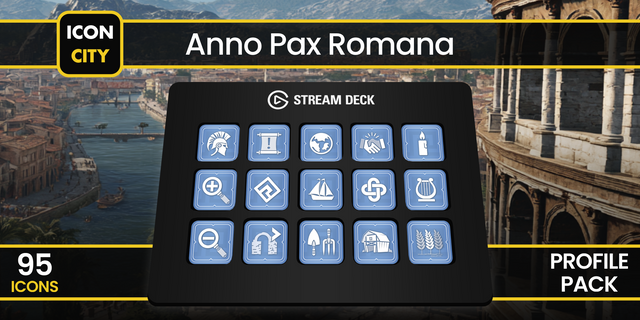
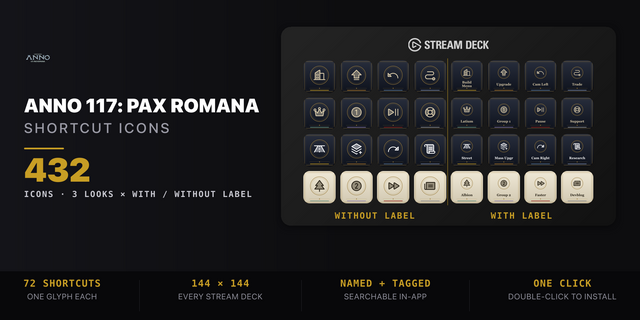
Also included: the 144-icon Anno 117: Pax Romana icon pack (72 icons in 2 finishes), as a .streamDeckIconPack you can install with a double-click. Every key in this profile, available to drop on any action you like.
Try it first: press the keys of this profile in your browser, no install — https://streamdeck.adx.cool/try/anno-117-pax-romana/
Learn more about Anno 117: Pax Romana: https://www.ubisoft.com/en-us/game/anno/117-pax-romana
v1.0 — 2026-09-20 — first release.
Inside: • Build (17) — the construction menu, street, paved road, residence, warehouse, farmfield, planning mode, move, copy, demolish, rotate and the two pause-building keys • Upgrade (6) — the generic tool and mass upgrade, plus the Regional and Roman residence upgrades and their mass versions • Camera (13) — rotate, zoom, reset, postcard, cinematic, and F5–F10 to recall six saved viewpoints • Menus (8) — trade routes, research, religion, diplomacy, island storage, world map, governance statistics, ship list • Navigation (7) — Latium and Albion, next selection, next ship, next ruin, last notification • Groups (10), Time & Interface (8), and a Help folder with three official links
Left out on purpose: WASD camera movement is held rather than tapped, Alt+F4 quits the game, and Take Screenshot uses a key a Stream Deck cannot send. Windows only, as the game is.
Version 1
Sep 25, 2026
Details
Type
Gaming
Device
Stream Deck MK
Stream Deck Neo
Stream Deck XL
OS
Windows
Compatibility
Stream Deck 6.4 or later
Size
6.22 MB
Version
1
Language
English
Support
Icons
Yes
Additional links
You might also like