Utilities
App Launcher
Overview
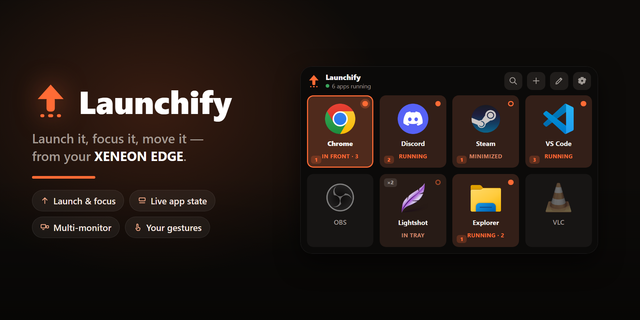
Launch your apps with a tap using App Launcher, an interactive XENEON EDGE widget that brings your applications, games, and websites together. Build your canvas with favorites, custom categories, and shortcuts that launch multiple apps at once.
This is an actively maintained project, with more updates planned. Suggestions are always welcome.
What’s Included
Keep your everyday apps within reach.
Application Library: Discover supported installed applications and organize them into categories.
Favorites: Keep your most-used apps together for quick access.
Website Shortcuts: Add URLs with custom images or website icons.
Multi-launch: Open multiple apps from one tile and restore their saved window positions.
Gestures: Choose what happens when you double tap, or press & hold for example.
Custom Categories: Create, rename, reorder, and remove categories.
Add apps manually with a name and file path. Use the application’s icon or choose your own image.
Touch Controls and Layouts
Launch apps from your touchscreen and choose what happens when you tap an app that is already running.
Supports vertical orientation for XENEON EDGE.
Configure double-tap and press-and-hold gestures to bring apps forward, minimize or close them, or open their menus.
Adjust tile sizes, hide titles, and show or hide category labels. Assign multiple apps through the category manager or organize individual tiles from their menus.
Customization
Choose normal, light, or dark mode through iCUE, then override the appearance with your own settings.
Multiple supported languages.
Customize background, tile, and font colors with the built-in color wheel or hex values. Adjust transparency, liquid glass, corner shapes, and tile depth.
Rename apps, change their images, and show or hide the header. Expand the search button to find an app.
Your appearance, favorites, and categories are saved between restarts and updates.
Multi-launch and Window Positions
Choose the apps you use together, arrange their windows, and save their positions. Launch the shortcut to open those apps and restore the saved layout.
Data and Connectivity
Requires the App Launcher module in our Respawn Companion app, available through Related Downloads on this product page.
The module connects locally to your applications and windows. No Steam account connection is required. Update notices appear in the widget as a notification.
Compatibility
Designed for XENEON EDGE and iCUE on Windows.
App discovery, running indicators, and window controls depend on each application. Some apps may restrict closing, bringing windows forward, or restoring positions. Website shortcuts use your default browser.
Version 1.0 - Added support for XENEON EDGE.
Version 1
Sep 29, 2026
Details
Type
Utilities
Device
XENEON EDGE
OS
Windows
Size
98.43 KB
Version
1
Language
Chinese (Simplified)
English
French
German
Italian
Japanese
Korean
Russian
Spanish
Ukrainian
Support
Dashboard Sizes
Extra large
Large
Medium
Small
Recommended Orientation
Horizontal
Vertical
Interactive
Yes
Additional links
You might also like