Business
Apple Keynote Profiles for Stream Deck
by Schwab Music
Overview
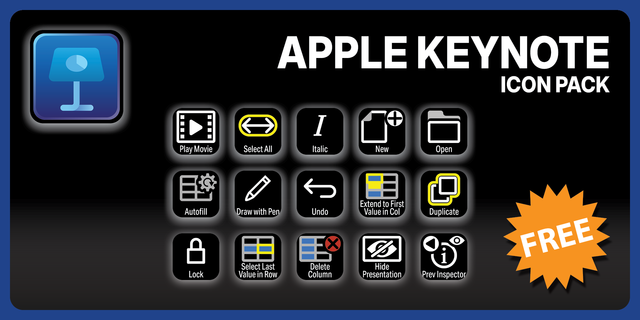
Supercharge your Apple Keynote workflow with the Elgato Stream Deck and over 210 free custom icons designed for building slides, animating transitions, and running presentations. Instantly trigger builds, transitions, and presenter tools at the touch of a button — keeping your slides polished and your focus on the story. These custom icons for Apple Keynote are designed for clarity — high-contrast and easy to read at a glance, so you can build a Stream Deck layout that fits the way you actually work.
English (QWERTY) keyboard layout required.
Stream Deck XL, Stream Deck Regular or Stream Deck Plus required for profile.
Shortcut commands may need to be altered to work with custom profile.
Stream Deck XL / Regular Mac Profile ONLY
Stream Deck Plus Mac Profile ONLY
Keyboard Shortcuts
120+ programmed commands for the Stream Deck XL, Stream Deck Regular and Stream Deck Plus. Many of the menu items available via shortcut keys in Apple Keynote at the tip of a finger. Organized into folders for easy access.
What’s Included
.streamDeckIconPack File
Labelled / Unlabelled Icons
Stream Deck XL Profile and Stream Deck Regular Profile (Mac ONLY) for both Labelled and Unlabelled Icons Sets
Stream Deck Plus Profile (Mac ONLY)
Manuals
214 Labelled and 214 Unlabelled icons for Apple Keynote. XL, Reg (15-key) and Plus profiles included.
Version 1
Aug 5, 2026
Details
Type
Business
Creative Tools
Productivity
Device
Stream Deck +
Stream Deck MK
Stream Deck XL
OS
macOS
Compatibility
Stream Deck 7.1 or later
Size
13.41 MB
Version
1
Language
English
Support
Dial support
Yes
Icons
Yes
Additional links
You might also like
-thumbnail-optimized-33d9db42-eedb-45a6-abed-1d49512d3b31.png)