Audio
Apple Music Shortcut
by Adx.cool
Overview
The complete Apple Music keyboard shortcut pack for Stream Deck.
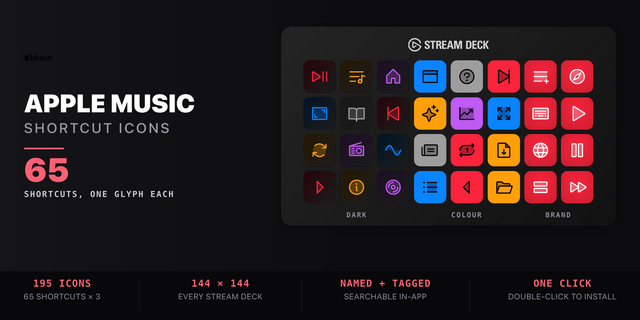
65 shortcuts across 5 categories — organized, scored by importance, and ready to install on Stream Deck Mini, Neo, Classic / MK.2, XL. Stop memorizing key combos. One tap, one action.
What's included:
• Playback (21): Play / Pause, Next Track, Previous Track, Play in App, Play from Start, and 16 more • Library (17): New Playlist, New Playlist from Selection, New Smart Playlist, Refresh Genius, Store & Page, Import File, and 12 more • View & Window (17): Mini Player, Switch to Mini Player, Full Screen Player, Visualizer, Column Browser, and 12 more • Explore (6): Listen Now, Browse, Top Charts, Radio, Search Apple Music, and 1 more • Help (4): Music Help Menu, Open Apple Support, Keyboard Shortcuts, Apple Music Newsroom
Features: • 65 keys across 5 folders — every keystroke taken from Apple's official Music keyboard reference, none invented • Explore folder: Listen Now, Browse, Top Charts, Radio, Search and Library open as deeplinks, so they work with no shortcut behind them • Play/Pause, Next and Previous route through the OS media keys — they fire while you are in another App • Fits every keyboard Stream Deck: Mini, Neo, Stream Deck and XL • Album, chapter and song stepping, Genius Shuffle, the equalizer and Stream Audio URL — the full Playback chapter of Apple's guide • Smart Profile auto-switch: the layout appears the moment Music.app takes focus • Help folder links Apple Support, the current keyboard cheatsheet and the Apple Music newsroom
Install: double-click any .streamDeckProfile to import. The App binding is pre-filled to Apple Music — auto-activates on focus. If it didn't pre-fill, set it manually under Stream Deck → Preferences → Profiles → App.
Also included: the 195-icon Apple Music icon pack (65 icons in 3 finishes), as a .streamDeckIconPack you can install with a double-click. Every key in this profile, available to drop on any action you like.
Try it first: press the keys of this profile in your browser, no install — https://streamdeck.adx.cool/try/apple-music/
Learn more about Apple Music: https://www.apple.com/apple-music
v1.1.0 — 2026-09-28 — Fix: the three media keys now do what they say.
Play / Pause, Next Track and Previous Track are Stream Deck's own OS media actions, and v1.0 had their slots shuffled: Play / Pause skipped back a track, Next Track paused, Previous Track skipped forward. The slots are now the ones Elgato's own default profiles use. Smart Profile now points at Music's real path.
Version 1.1
Sep 29, 2026
You might also like