Productivity
Audio Control Center
by PackRat 🐀
Overview
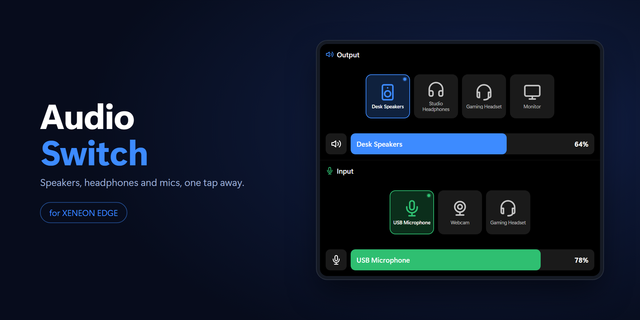
Audio Control Center turns your CORSAIR XENEON Edge into a touch-first Windows sound control surface.
See the current Windows default output, switch between detected headphones, speakers, displays and other playback devices, and adjust real endpoint master volume or mute without opening Windows Settings.
The input side does the same job for microphones: see the active Windows default input, switch to another detected microphone, mute it, and adjust microphone endpoint volume when the hardware and driver expose that control reliably.
Clear ACTIVE status, friendly Windows device names, large touch controls and dedicated disconnected or no-device states keep the panel understandable at a glance. All eight XENEON Edge layouts are tuned separately.
Audio Control Center requires the free PackRat Audio Bridge companion on Windows. Download: https://packrat-site.pages.dev/downloads/audio-control-center\n\nExtract the ZIP and run INSTALL_STARTUP.cmd for a per-user startup install, or START_AUDIO_BRIDGE.cmd for portable/manual use. The bridge runs only on your PC, uses Windows Core Audio for endpoint discovery and volume control, and talks to the XENEON widget over loopback localhost. No administrator install, Windows service, PackRat cloud service, account, or telemetry is required.
Windows does not expose a documented public setter for the global default audio endpoint. PackRat Audio Bridge isolates the Windows policy interface behind a capability check and disables switching if Windows rejects it; volume and mute remain independent.
Part of the PackRat 🐀 collection for CORSAIR XENEON Edge.
• Switch between detected Windows output devices and microphones from XENEON Edge.
• Control default output master volume, microphone endpoint volume when available, and mute/unmute state.
• Clear active-device, no-device, bridge-offline, reconnecting, Windows-audio-error, and bridge-version states.
• Free local PackRat Audio Bridge has a direct Windows download plus per-user startup install and portable modes; no cloud account or telemetry.
• Touch-first responsive layouts are tuned for all eight XENEON Edge slot sizes and orientations.
Version 1
Sep 14, 2026
Details
Type
Productivity
Utilities
Device
XENEON EDGE
OS
Windows
Size
24.61 KB
Version
1
Language
English
Support
Dashboard Sizes
Extra large
Large
Medium
Small
Interactive
Yes
You might also like