Business
Autodesk 3ds Max Shortcut Profile + Icon Pack
by Adx.cool
Overview
The complete Autodesk 3ds Max keyboard shortcut pack for Stream Deck.
123 shortcuts across 10 categories — organized, scored by importance, and ready to install on Stream Deck Classic / MK.2, XL. Stop memorizing key combos. One tap, one action.
What's included:
• Modeling (21): Vertex Level, Edge Level, Border Level, Polygon Level, Element Level, and 16 more • Scene (19): New Scene, Open File, Save File, Save As, Save Incremental, and 14 more • Transform (18): Select and Move, Select and Rotate, Smart Scale, Scale Cycle, Smart Select, and 13 more • Display (16): Hide Selection, Hide Unselected, Unhide All, Isolate Selection, Isolate Toggle, and 11 more • Viewport (15): Maximize Viewport, Zoom Extents, Zoom Extents All, Zoom Extents Selected, Zoom Mode, and 10 more • Selection (12): Select All, Select None, Select Invert, Select By Name, Select Similar, and 7 more • Views (10): Front View, Left View, Top View, Camera View, Perspective View, and 5 more • Animation (7): Play Animation, Forward One Frame, Back One Frame, Go to Start, Go to End, and 2 more • Snaps (4): Snaps Toggle, Angle Snap, Cycle Snap Type, Axis Constraints in Snaps • Help (1): Open Docs
Features: • All five sub-object levels on their own keys — vertex, edge, border, polygon, element • The complete PolyTools row: Swift Loop, Set Flow, Insert Loop, Spin Edge, Straighten and Circle Loops • Gizmo axis constraints on F5/F6/F7 and the plane cycle on F8 • Every binding read from Autodesk's own 3ds Max 2027 hotkey reference • A distinct icon on all 123 keys
Install: double-click any .streamDeckProfile to import. The App binding is pre-filled to Autodesk 3ds Max — auto-activates on focus. If it didn't pre-fill, set it manually under Stream Deck → Preferences → Profiles → App.
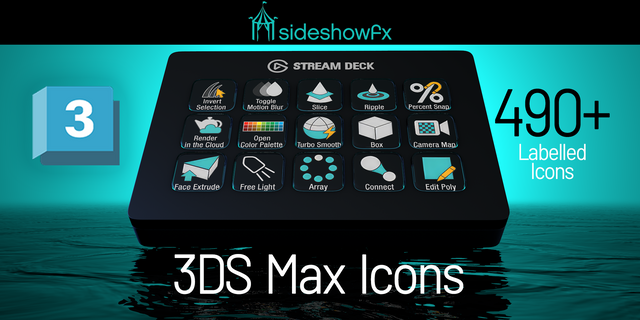
Also included: the 369-icon Autodesk 3ds Max icon pack (123 icons in 3 finishes), as a .streamDeckIconPack you can install with a double-click. Every key in this profile, available to drop on any action you like.
Try it first: press the keys of this profile in your browser, no install — https://streamdeck.adx.cool/try/3ds-max/
Learn more about Autodesk 3ds Max: https://www.autodesk.com/products/3ds-max
Setup (required for some keys)
Windows only — 3ds Max ships no macOS build.
These are the Main UI hotkeys. 3ds Max also carries separate keymaps for the Material Editor, Track View, UVW Unwrap, Particle Flow, Hair Styling and Biped, which fire only when those editors hold focus; none are in this profile.
Ctrl+C is Create Camera From View in 3ds Max, not Copy. That is Autodesk’s binding, not a mistake, and it is why no Copy key ships here.
v1.0 — first release, built against the 3ds Max 2027 hotkey reference.
123 keys across 10 folders: Transform, Selection, Modeling, Viewport, Views, Display, Animation, Snaps, Scene and Help.
What it covers that a hand-built profile usually misses:
All five sub-object levels (1-5) as their own keys, not a cycle
The whole PolyTools row on Alt+1..5 and Alt+Shift+2..4
Gizmo axis constraints on F5/F6/F7 plus the plane cycle on F8
Hold and Fetch, the two-key scene snapshot pair most people forget exists
Save Incremental on Ctrl+Alt+S
What it deliberately leaves out: the modal keymaps. 3ds Max documents separate hotkey tables for the Material Editor, Track View, UVW Unwrap, Particle Flow, Hair Styling and Biped, and those only fire when their editor holds focus. A deck key cannot tell, so none of them ship.
No Copy key. In 3ds Max Ctrl+C creates a camera from the current view — that is Autodesk's binding, and a key labelled Copy that sends it would be a bug.
Version 1
Sep 22, 2026
Details
Type
Business
Creative Tools
Device
Stream Deck MK
Stream Deck XL
OS
Windows
Compatibility
Stream Deck 6.4 or later
Size
5.9 MB
Version
1
Language
English
Support
Icons
Yes
Additional links
You might also like