Development
AWS Deck
by Mlifell
Overview
AWS Deck — watch and act on your AWS resources from your Stream Deck.
Each key mirrors one AWS resource at a glance and lets you act on it with a tap or a hold — no switching to the console or terminal. Give any key a custom display name.
WHAT'S INCLUDED (4 key types)
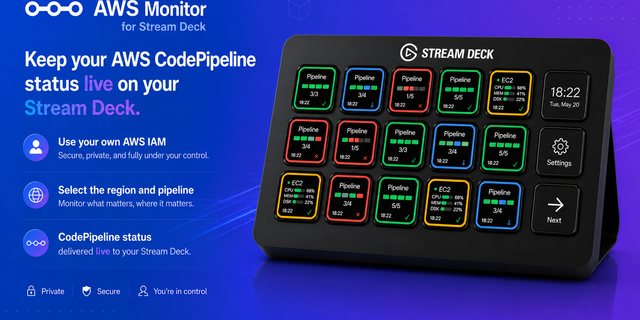
• CodePipeline — See a pipeline's stage progress and overall state (running, succeeded, failed) at a glance. When a stage is waiting on a manual approval, the key turns amber: tap to switch between Approve and Reject, then hold to confirm. Hold to retry a failed stage, or tap to open the pipeline in the console.
• Lightsail Instance — See an instance's state (running, stopped, starting). Hold to SSH straight in through your default Terminal when it's running — using short-lived, certificate-based access with the instance's host keys pinned — or hold to start it when it's stopped. Tap to open the Lightsail console.
• AWS Billing — See your account's month-to-date cost via Cost Explorer. Refreshes on a slow cadence to keep Cost Explorer charges negligible; hold to refresh on demand, or tap to open Cost Management.
• CloudWatch Alarm — See an alarm's state (OK, ALARM, or no data), with a firing alarm called out in red. Tap to open the alarm in the console.
Every key shares one consistent, at-a-glance status row, so a mixed deck reads as one family.
MORE TO COME
AWS Deck is built on an extensible provider architecture — additional AWS services (such as ECS and Lambda) are planned for future updates.
REQUIREMENTS & NOTES
• macOS, Stream Deck 6.9+, and the AWS CLI installed and configured.
• Uses your existing local AWS credentials (named profiles, SSO, or environment). It never asks for or stores your AWS keys — you only choose which resource each key watches.
• Unofficial. Not affiliated with or endorsed by Amazon or AWS. "AWS", "CodePipeline", "Lightsail", and "CloudWatch" are trademarks of Amazon.com, Inc.
# AWS Deck v0.1.0 — first release
Watch and act on your AWS resources from your Stream Deck. Each key mirrors one resource; act with a tap or hold — no console or terminal needed.
CodePipeline — Stage progress and state. On a manual approval, tap to switch Approve/Reject, hold to confirm. Hold to retry a failed stage; tap opens the console.
Lightsail — Instance state. Hold to SSH in via Terminal (short-lived, certificate-based, host keys pinned) when running, or to start it when stopped. Tap opens the console.
Billing — Month-to-date cost via Cost Explorer. Polls slowly to stay cheap; hold to refresh, tap opens Cost Management.
CloudWatch Alarm — Alarm state (OK / ALARM / no data), firing shown in red. Tap opens the console.
Every key: optional custom name, one consistent status row, and your local AWS credentials (never stored).
Requires macOS, Stream Deck 6.9+, and the AWS CLI. More services (ECS, Lambda) coming.
Unofficial — not affiliated with Amazon or AWS.
Version 0.1
Jul 29, 2026
Details
Type
Development
OS
Mac
Compatibility
Stream Deck 6.9 or later
Size
158.86 KB
Version
0.1
Language
English
Support
Profiles
No
Dial support
No
You might also like