Utilities
Bluetooth Device Connector
by Chromus
Overview
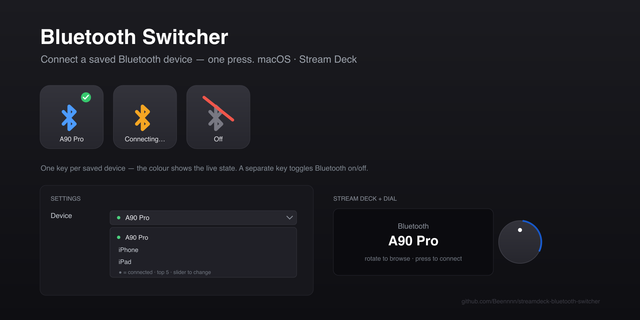
One-press Bluetooth connect & disconnect for your Stream Deck — switch headphones, speakers, and mics without opening Windows settings.
Switch your Bluetooth audio straight from your Stream Deck — no more digging through Windows settings. Press a key to connect your AirPods, headset, speaker, or Bluetooth mic; press again to disconnect. The key shows live status, so you always know what's connected.
Give each device its own key and keep headphones, speakers, and microphones on separate buttons — switch instantly for streaming, calls, and back-to-back meetings.
Features: • One press to connect, press again to disconnect • Live status on the key — Disconnected, Connecting, Connected, Error — and it re-syncs after a Stream Deck restart • Pick any paired device from a dropdown, no typing required • Connects both audio (A2DP) and microphone (Handsfree) profiles • Speaker-only support for devices without a headset profile, like Amazon Echo Dot and JBL speakers • Add as many keys as you need, one per device • Sound and on-key text feedback for every action
Fixed stale connection indicators when AirPods or other Bluetooth audio devices disconnect outside Stream Deck, such as when placed in their case or connected to another device. The plugin now refreshes the actual audio connection state automatically. Also fixed special characters in Bluetooth device names and improved visual feedback during connection and disconnection.
Version 1.1.0.6
Aug 28, 2026
You might also like