Monitoring
Browser Lite
Overview
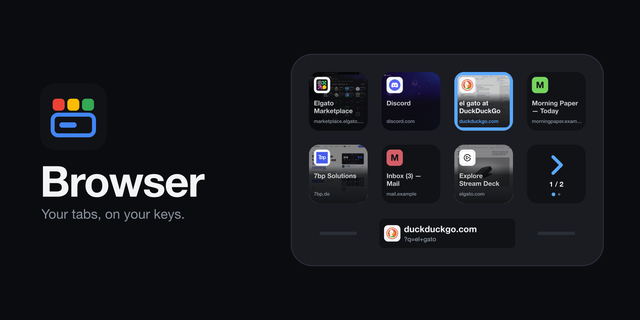
Browser Lite puts the first four tabs of your browser on your Stream Deck, for free. Every key is a tab: its icon, its title, its domain. The tab in front wears a blue frame you can see from any angle. Tap a key and your browser switches to that tab.
It follows the browser you are actually using — Chrome (tested in Chrome mostly, but should also work with Safari, Brave, Edge or Vivaldi) — and switches along when you do. There is no extension to install in any of them, and nothing to sign in to.
FOUR TABS — Put Tabs on up to five keys in a row. The first four show your first four tabs. If more are open, the fifth key says how many.
WHAT THE FULL BROWSER ADDS — Every tab, on as many keys as you give it, with a key that pages when there are more tabs than keys. Hold to close. A New tab key. Page previews on the keys. And on a Stream Deck Neo, the address on the Infobar. Lite stays free either way.
A PROFILE OF ITS OWN — We suggest a Stream Deck profile just for your browser. In Stream Deck's Preferences, under Profiles, pick your browser as that profile's application, and Stream Deck switches to it by itself whenever the browser comes to the front: your tabs are on the keys exactly when you are browsing, and your other keys are back when you are not. It is a suggestion, not a requirement. Tabs works on any profile, page or folder, beside whatever else you keep there.
IT TELLS YOU WHAT IT NEEDS — The first time, macOS asks whether Stream Deck may control your browser. Say yes and the tabs appear. If the dialog does not come, quit your browser and open it again. If you said no, the keys say so, and a tap opens the right page in System Settings. No browser open? A tap starts one.
PRIVATE BY CONSTRUCTION — No account, no analytics, no server of ours. Site icons are fetched from the sites you already have open, not from an icon service. Nothing about your tabs leaves your Mac.
Firefox cannot be controlled this way and is not supported.
macOS 12 or newer, with the Stream Deck app 7.1 or newer. Works on any Stream Deck with keys.
The first four tabs of your browser on your keys, with icon, title and site. Tap a key to switch to that tab. A fifth key counts the tabs that are not shown. For Chrome, Safari, Brave, Edge and Vivaldi on macOS, with no browser extension.
Version 1
Oct 12, 2026
Details
Type
Monitoring
Productivity
Utilities
OS
Mac
Compatibility
Stream Deck 7.1 or later
Size
82.75 KB
Version
1
Language
English
Support
Profiles
No
Dial support
No
Neo Infobar support
No
You might also like