Gaming
Bus Simulator 27 Shortcut Profile
by Adx.cool
Overview
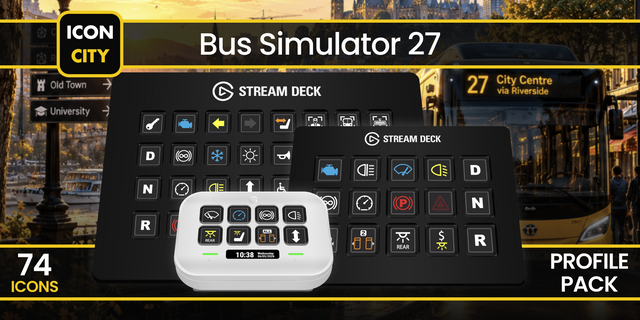
The complete Bus Simulator 27 keyboard shortcut pack for Stream Deck.
35 shortcuts across 7 categories — organized, scored by importance, and ready to install on Stream Deck Mini, Neo, Classic / MK.2, XL. Stop memorizing key combos. One tap, o ne action.
What's included:
• Cabin (8): Cycle Views, Recenter View, Passenger Mirror View, Map Menu, Shortcut Menu, and 3 more • Doors (6): Door 1, Door 2, Door 3, Door 4, Door 5, and 1 more • Signals (5): Left Turn Signal, Right Turn Signal, Hazard Lights, Horn, Ramp • Lights (5): Light Switch, High Beam, Passenger Lights, Cockpit Lights, Bus Computer Lights • Gearbox (5): Select Drive, Select Neutral, Select Reverse, Gear Up, Gear Down • Systems (5): Cycle Battery, Retarder, Speed Limiter, Windshield Wipers, Seat Adjustment • Help (1): Open Controls Guide
Features: • 35 Bus Simulator 27 controls across 7 categories — Doors, Signals, Lights, Gearbox, Systems, Cabin, Help. • All five doors plus All Doors on their own keys, so you stop counting number-row keys at a stop. • The full dashboard: low and high beam, saloon, cockpit and bus-computer lighting, hazards, ramp, retarder, speed limiter, wipers. • Drive, Neutral and Reverse on F7/F8/F10 — the three keys the keyboard hides furthest from your hand. • Smart Profile: the deck switches itself the moment Bus Simulator 27 takes focus. • Two looks: Amber (the classic LED blind) and White, side by side. • Keys-only: Stream Deck Classic/MK.2, XL and Neo (Windows).
Install: double-click any .streamDeckProfile to import. The App binding is pre-filled to Bus Simulator 27 — auto-activates on focus. If it didn't pre-fill, set it manually under Stream Deck → Preferences → Profiles → App.
Learn more about Bus Simulator 27: https://www.bussimulator.com/en/
Smart Profile is bound to BusSimulator27.exe. That is the executable name Steam publishes; on the Epic Games Store or the Microsoft Store the file may sit elsewhere — open the profile settings in the Stream Deck app and point the app binding at your own copy.
Doors 1-5 are also bound to the numeric keypad in game. This profile sends the number-row keys, which is what the game lists first and what every keyboard has.
The Bus Computer view toggle is deliberately missing. The game binds it to a bare Ctrl, and a deck key taps and releases rather than holding, so a lone modifier has no deck equivalent. Rebind it to a real key in game and add it as a Hotkey action if you want it.
Walking, running and jumping are not here either: they are held inputs, and a bus is not driven with them. Steering stays on the keyboard or your wheel.
Recenter View is sent as F4. The game also accepts the End key for the same action.
v1.0 — Initial release (September 2026), built for launch day.
35 Bus Simulator 27 controls across 7 categories: Doors · Signals · Lights · Gearbox · Systems · Cabin · Help.
What's inside: • Every door on its own key — 1 to 5 plus All Doors — and the wheelchair ramp • Turn signals, hazards and the horn where your hand already is • The whole lighting panel: main and high beam, saloon, cockpit, bus computer • Drive / Neutral / Reverse plus manual gear up and down • Battery, retarder, speed limiter, wipers and seat adjustment • Camera cycling, view recentre, passenger mirror, map, quick menu and pause
Smart Profile switches the deck when the game takes focus.
Two looks included: Amber (the classic dot-matrix destination blind) and White.
Windows only. Built against the demo's default binds — see the setup notes.
Version 1
Sep 10, 2026
You might also like