Monitoring
Cams Lite
Overview
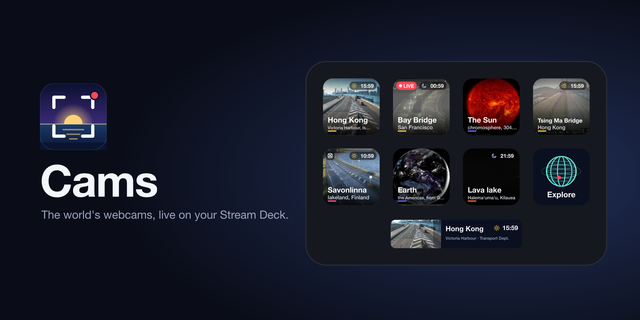
Cams Lite puts live webcams from around the world on your Stream Deck, free: Kīlauea's lava lake, Mount Rainier, Hong Kong's harbour, a buoy far out in the Pacific, the Sun. Each with its own clock, and Random always finds one where it is day.
EXPLORE — One key opens the browser on your whole deck: nine categories, each over a cam where it is day right now. A category starts with Random, then every cam with its own clock and a LIVE mark for video.
THE WHOLE DECK — Tap a cam and its picture is laid behind all your keys and the gaps between them, so a bridge cable runs straight from one key to the next. Video plays a few seconds behind live.
ONE CAM ON A KEY — From the catalog, or your own camera: snapshots, MJPEG, HLS, MPEG-DASH, RTSP (H.264 and H.265), RTMP and video files, with Basic and Digest logins.
SOURCES ANYONE MAY SHOW — US National Park Service, USGS, NOAA and NASA, Fintraffic, NZ Transport Agency, Hong Kong's Transport Department, Singapore's LTA and Caltrans. Every cam credits its source.
Cams, the full edition, puts as many cams and cameras on your keys as you like.
No account, no tracking. macOS 13 or newer, or Windows 10 or newer (video on Windows needs ffmpeg), with the Stream Deck app 7.6 or newer. The Infobar action needs a Stream Deck Neo.
Two more Stream Decks
The browser now comes with a profile for the Stream Deck + XL and for Corsair's Galleon 100 SD, alongside the Mini, Neo, MK.2, Plus and XL.
Nothing else changes; your cam stays as it is.
Version 1.1
Oct 27, 2026
Details
Type
Monitoring
Streaming
Utilities
OS
Mac
Windows
Compatibility
Stream Deck 7.6 or later
Size
237.78 KB
Version
1.1
Language
English
Support
Dial support
No
Profiles
Yes
Neo Infobar support
Yes
You might also like