Business
Canva Fastlane (Stream Deck + XL)
by FlowKits
Overview
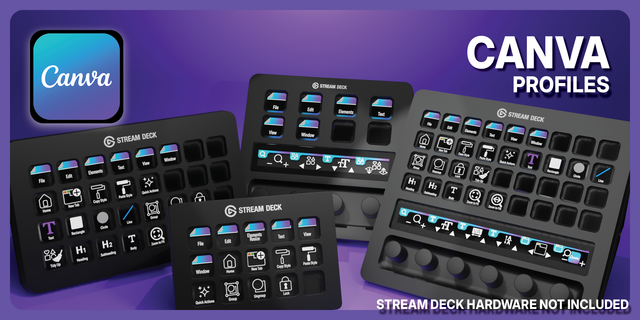
🎨 Canva for Stream Deck + XL — The complete Canva Stream Deck profile with 6 intuitive dials and 36 keys! Every minute hunting through Canva's menus is a minute you could be creating. Canva Fastlane puts your entire toolkit under your fingertips — 36 keys and 6 precision dials, all mapped and ready to go ⚡
✅ 7 workflow pages. 200+ mapped actions. Ready out of the box. ✅ Touch strips with visual icons so you always know what each dial controls. ✅ Single tap for commonly used Canva actions and tools ✅ 6 dials that adapt to every page — zoom, resize fonts, adjust spacing, navigate layers, undo/redo and more.
This isn't just another Canva Stream Deck profile — it's the workflow upgrade designers have been waiting for.
⚡ Why You'll Love It Nobody remembers Cmd+Shift+K for uppercase mid-creation. We remove that friction so every shortcut you wish you could remember is now a single button press, organised in clear, colour-coded layouts for instant recognition and muscle memory.
The most useful tools are placed up front where your fingers naturally land, grouped so that after a few sessions your hands know where to go before your eyes do. That's the difference between a shortcut list and a genuine workflow upgrade.
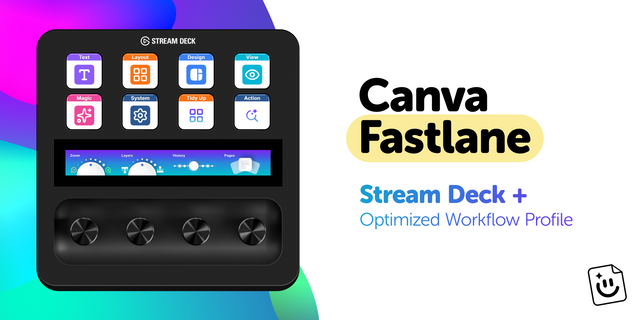
🎛️ 6 Dials That Actually Make Sense The Stream Deck + XL's six precision dials change function on every page — and each one earns its place:
🔍 Zoom — Rotate to zoom smoothly, press to fit screen instantly. 🔤 Font Size — Dial in perfect sizing in real-time. Watch text respond as you turn. ↔️ Spacing — Fine-tune letter and line spacing with analogue precision. 📐 Layers — Spin through canvas elements, press to open the layers panel. ⏪ History — Smooth cycle through undo and redo. 📄 Pages — Navigate between Canva pages, press to add a new one.
On the Text page, dials swap to dedicated typography controls — font size, line spacing, and letter spacing all get their own dial. This tactile, responsive control makes you wonder how you ever designed without it.
📦 What's Inside
🗂️ 7 intuitive workflow pages — Home, Text, Layout, Design, View, Magic Tools, and System. Organised the way designers actually think. 🎨 200+ mapped actions — every key carefully chosen and ranked for how much time it saves you. 🎛️ Page-specific dial mappings — all 6 dials adapt to the page you're on with context-aware functions. 🌈 Color-coded categories for quick visual recognition. 🏷️ Editable text labels — change any label to your language or preference. Truly multi-lingual friendly. 💻 Windows and Mac compatible with correct modifier keys, automatically.
✨ Beautifully Designed We believe your tools should look as good as your work. Every icon is carefully selected for clarity. Every colour choice is intentional. After a few sessions, you'll reach for buttons by muscle-memory without thinking.
🚀 Quick Install 1️⃣ Download and extract the .zip file. 2️⃣ Double-click the Stream Deck file to import the profile. 3️⃣ Open Canva — you're good to go!
📥 What's Included ✅ Canva Fastlane Profile for Stream Deck + XL (.streamDeckProfile) ✅ Complete icon library for customisation
🎯 Perfect For Social media managers creating daily content. Marketing teams building assets. Content creators designing thumbnails. Anyone using Canva regularly who'd rather spend their time creating than hunting through menus.
Matched to today's Canva. I tested every key against the current version of Canva, so each one does exactly what its label says.
A layout your hands can learn. Home and Design are now one page. Every page shares the same zones, with Copy Style, Paste Style, Group, Ungroup, Lock and Tidy Up in the same spot on the right, and Duplicate sits next to Action up top.
Dials that stay put. The dials keep the same order on every page. Only the fourth changes, to Letter Spacing on the Text page.
New keys. Subscript, Superscript, Rotate Left and Right, Bulleted List, Layers, Save, Download, Share, Resize, Print and comments.
Updating. Import the new profile. It's called Canva Fastlane now, and Stream Deck keeps your old one next to it, so delete that once you're happy.
Version 1.1
Oct 28, 2026
Details
Type
Business
Creative Tools
Productivity
Device
Stream Deck + XL
OS
macOS
Windows
Compatibility
Stream Deck 7.1 or later
Size
2.09 MB
Version
1.1
Support
Dial support
Yes
Icons
Yes
Additional links
You might also like