Productivity
Capture One Pro Profiles for Stream Deck +
by SideshowFX
Overview
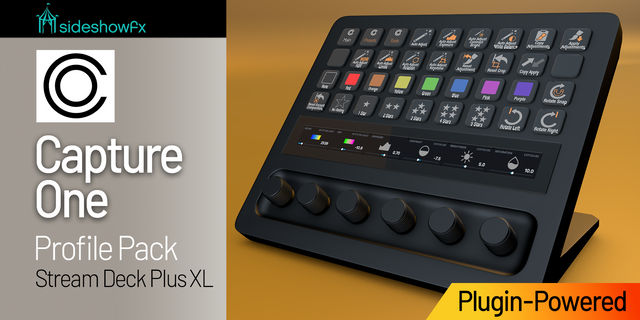
PUT CAPTURE ONE AT YOUR FINGERTIPS
81 ROTARY CONTROLS • 166+ SHORTCUTS • LIVE TWO-WAY FEEDBACK
Built exclusively for Stream Deck + • Mac only • Capture One 21 (14.0) or later • English Capture One and English macOS required
⚡ POWERED BY THE EXCLUSIVE SIDESHOWFX CAPTURE ONE PLUGIN
Go beyond keyboard shortcuts with direct, plugin-powered control of Capture One. Our proprietary plugin communicates directly with Capture One, delivering responsive rotary adjustments, real-time values and hands-on control of your creative workflow. Turn a dial. Watch Capture One respond. See the actual value on your Stream Deck.
🎛️ 81 ROTARY CONTROLS. REAL-TIME FEEDBACK.
Bring Capture One's adjustment tools directly to your Stream Deck + dials. Unlike conventional shortcut-based controls, our plugin reads actual adjustment values from Capture One and keeps supported controls in sync. Turn a dial and see the corresponding adjustment change. No blind nudging, no guessing and no complicated dial setup. Real controls. Real values. Creative freedom.
🔄 FOUR PROFILES. ONE STREAMLINED WORKFLOW.
Get four professionally organized profiles featuring 166+ programmed shortcuts and 81 rotary dial controls. Move between editing tasks with commands and adjustments arranged around common Capture One workflows. A powerful collection of controls, designed specifically for the compact Stream Deck +.
🎨 EXPLORE STYLES & PRESETS BY DIAL
Discover creative looks without constantly opening menus.
• Access 96 built-in presets across eight categories • Apply Capture One's built-in styles directly from keys • Browse preset categories using the Style Dial • Turn to preview looks directly on your image • Press to remove the selected preset
Explore all 37 black-and-white presets by turning a dial and watching each look appear on your photograph. Finding the right style becomes part of the creative process.
📸 TETHERED CAMERA CONTROL
Control compatible tethered camera settings directly from your Stream Deck +. Adjust ISO, shutter speed, aperture, exposure compensation, white balance, metering and more. Each dial works with the settings supported by your connected camera, while live feedback displays its current values—even when you change settings on the camera itself.
⚡ MORE THAN A SHORTCUT PROFILE
The exclusive SideshowFX plugin communicates directly with Capture One for supported functions, so rotary adjustments aren't dependent on your custom keyboard shortcuts. Tool buttons use keyboard shortcuts, while the plugin-powered dials provide direct control. Customize the included profiles to suit the way YOU edit.
✓ WHAT YOU GET
✓ Four preprogrammed Capture One profiles ✓ 81 programmed rotary dial controls ✓ 166+ programmed shortcuts ✓ Exclusive SideshowFX Capture One plugin ✓ Live two-way adjustment feedback ✓ Built-in style and preset controls ✓ Compatible tethered camera controls ✓ Customizable commands and layouts ✓ Free updates for existing owners
⚠️ BEFORE YOU BUY
• Stream Deck + only — not Stream Deck + XL • Mac only — Windows is not supported • Capture One 21 (14.0) or later required • English Capture One and English macOS required • English QWERTY keyboard required for Tool buttons only • Rotary dial adjustments support any keyboard language layout • Tethered camera controls depend on supported camera settings
PDF GUIDE: https://www.dropbox.com/t/71oYv2lc1HS1f8Bg
SIDESHOWFX — PREMIUM STREAM DECK WORKFLOWS. HANDCRAFTED & ENGINEERED SINCE 2019.
V2.0.1 - Oct. 2026
Fixed an issue where Capture One would not close if the Stream Deck plugin was active.
To update, download version 2.0.1 and double click the Capture One plugin in the pack to overwrite your existing plugin.
Version 2.0.1
Oct 22, 2026
Details
Type
Productivity
Device
Stream Deck +
OS
macOS
Compatibility
Stream Deck 7.1 or later
Size
10.06 MB
Version
2.0.1
Support
Icons
Yes
Dial support
Yes
Additional links
You might also like