Development
ChatGPT Desktop Shortcut Profile
by Adx.cool
Overview
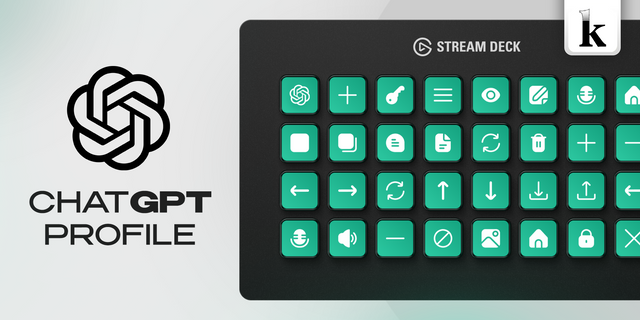
The complete ChatGPT Desktop keyboard shortcut pack for Stream Deck.
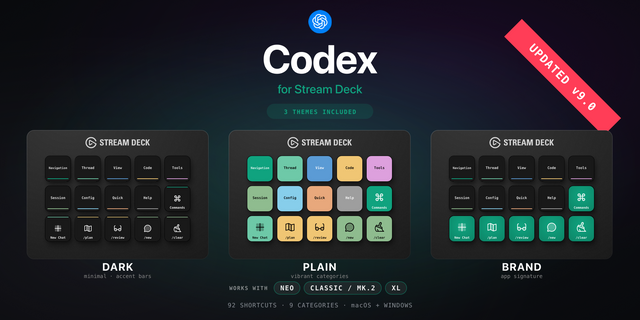
112 shortcuts across 9 categories — organized, scored by importance, and ready to install on Stream Deck Classic / MK.2, XL. Stop memorizing key combos. One tap, one action.
What's included:
• Commands (24): Plan Mode, Set Goal, Code Review, Init AGENTS.md, Compact Context, and 19 more • Window (15): Open command menu, Open settings, Open keyboard shortcuts, Navigate back, Navigate forward, and 10 more • Chats (15): New chat, New standalone chat, Quick chat, New temporary chat, Archive chat, and 10 more • Go To (15): Go to chat 1, Go to chat 2, Go to chat 3, Go to chat 4, Go to chat 5, and 10 more • Panels (12): Open folder, Toggle sidebar, Toggle bottom panel, Toggle terminal, Clear terminal, and 7 more • Open (10): A new local chat, Settings, Skills, Scheduled with the create flow open, Browser settings, and 5 more • Input (9): Open model picker, Open project picker, Start voice chat, Start dictation, Restore previous composer prompt, and 4 more • Browser (9): Open browser tab, Toggle browser panel, Go to line or focus browser address bar, Browser back, Browser forward, and 4 more • Help (3): Commands reference, Developer commands, Release notes
Features: • 113 controls read from OpenAI's own command reference — 51 in v1. • Every keyboard shortcut the app publishes: window, panels, chats, browser, input and modes. • Go straight to chat 1-9 and recent chat 1-6 on dedicated keys. • 10 deep links that jump into Settings, Skills, Scheduled and each connection type. • 24 slash commands for the composer, carried over from v1. • Three icon themes · macOS and Windows
Install: double-click any .streamDeckProfile to import. The App binding is pre-filled to ChatGPT Desktop — auto-activates on focus. If it didn't pre-fill, set it manually under Stream Deck → Preferences → Profiles → App.
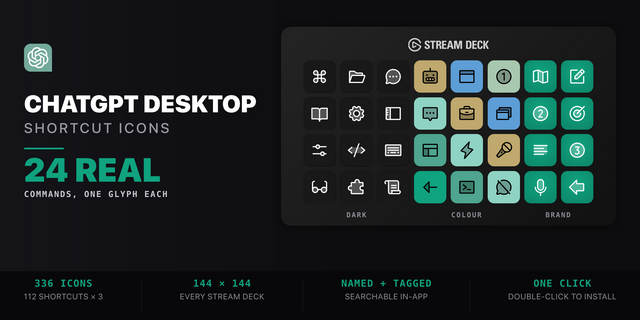
Also included: the 336-icon ChatGPT Desktop icon pack (112 icons in 3 finishes), as a .streamDeckIconPack you can install with a double-click. Every key in this profile, available to drop on any action you like.
Try it first: press the keys of this profile in your browser, no install — https://streamdeck.adx.cool/try/chatgpt/
Learn more about ChatGPT Desktop: https://learn.chatgpt.com/docs/reference/commands
112 shortcuts across 9 categories — What's included:
• Commands (24): Plan Mode, Set Goal, Code Review, Init AGENTS.md, Compact Context, and 19 more • Window (15): Open command menu, Open settings, Open keyboard shortcuts, Navigate back, Navigate forward, and 10 more • Chats (15): New chat, New standalone chat, Quick chat, New temporary chat, Archive chat, and 10 more • Go To (15): Go to chat 1, Go to chat 2, Go to chat 3, Go to chat 4, Go to chat 5, and 10 more • Panels (12): Open folder, Toggle sidebar, Toggle bottom panel, Toggle terminal, Clear terminal, and 7 more • Open (10): A new local chat, Settings, Skills, Scheduled with the create flow open, Browser settings, and 5 more • Input (9): Open model picker, Open project picker, Start voice chat, Start dictation, Restore previous composer prompt, and 4 more • Browser (9): Open browser tab, Toggle browser panel, Go to line or focus browser address bar, Browser back, Browser forward, and 4 more • Help (3): Commands reference, Developer commands, Release notes Features: • 113 controls read from OpenAI's own command reference — 51 in v1. • Every keyboard shortcut the app publishes: window, panels, chats, browser, input and modes. • Go straight to chat 1-9 and recent chat 1-6 on dedicated keys. • 10 deep links that jump into Settings, Skills, Scheduled and each connection type. • 24 slash commands for the composer, carried over from v1. • Three icon themes · macOS and Windows
Version 2
Sep 14, 2026
Details
Type
Development
Productivity
Device
Stream Deck MK
Stream Deck Neo
Stream Deck XL
OS
macOS
Windows
Compatibility
Stream Deck 6.4 or later
Size
9.43 MB
Version
2
Support
Icons
Yes
Additional links
You might also like