Development
Claude Desktop Shortcut Profile
by Adx.cool
Overview
Stream Deck + ready — dial-aware Claude Desktop shortcut pack with custom touchstrip layouts.
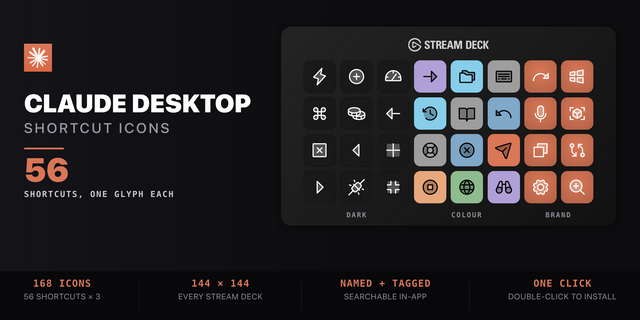
56 shortcuts across 7 categories — organized, scored by importance, and ready to install on Stream Deck Classic / MK.2, XL, +, +XL, Galleon100SD. Stop memorizing key combos. One tap, one action.
Dial features (Stream Deck +, +XL, Galleon100SD): • 4 dedicated dial layouts on the touchstrip • Rotate to adjust values (with optional acceleration on rapid spin) • Press, long-press, and touch tap each bind to distinct actions • Falls back gracefully to keypad-only on Stream Deck Classic / MK.2, XL
What's included:
• Code (15): Usage Card, Cost Card, Close Session, Toggle Diff Pane, Toggle Browser Pane, and 10 more • Chat (9): New Conversation, Command Palette, Focus Input, Copy Last Response, Stop Response, and 4 more • Features (9): Projects, Recents, New Chat (web), Connectors / MCP, Settings (claude.ai), and 4 more • Window (9): Focus Next Split, Focus Previous Split, Close Split View, Toggle Full Screen, Zoom In, and 4 more • Navigate (7): Next Session, Previous Session, Back, Forward, Find in Page, and 2 more • Quick Entry (4): Quick Entry (Summon), Quick Entry (Windows), Voice Dictation, Send Message • Help (3): Shortcuts Panel, Open Docs, Claude Support
Features: • 56 shortcuts and deep-links across 7 folders • Every menu key read out of the shipped App, not a cheat sheet • Sessions, splits, panes — the whole Code-tab surface • Deep-links to Projects, Artifacts, Connectors, Research • Quick Entry summon, Chat, Code and claude.ai in one profile
Install: double-click any .streamDeckProfile to import. The App binding is pre-filled to Claude Desktop — auto-activates on focus. If it didn't pre-fill, set it manually under Stream Deck → Preferences → Profiles → App.
Also included: the 168-icon Claude Desktop icon pack (56 icons in 3 finishes), as a .streamDeckIconPack you can install with a double-click. Every key in this profile, available to drop on any action you like.
Try it first: press the keys of this profile in your browser, no install — https://streamdeck.adx.cool/try/claude-desktop/
Learn more about Claude Desktop: https://claude.ai/download
v2.3 — 2026-10-22 Checked against Claude Desktop 3 (3.1623.0). Nothing you rely on moved — sessions, split view, search, zoom and the four dials all work as before.
New: • Files — show or hide the Files pane (Cmd+Shift+F / Ctrl+Shift+F) • Preview — show or hide the Preview pane (Cmd+Shift+P / Ctrl+Shift+P)
Changed: • The Diff key is now 'Changes', the name Claude Desktop 3 gives that pane
Good to know: Claude shows either a Browser pane (Cmd+Shift+B) or a Preview pane (Cmd+Shift+P), depending on your account. Both keys are on the deck; the one your account doesn't have does nothing.
Existing customers: re-install the .streamDeckProfile to pick up the new keys. The dial plugin is unchanged.
Version 2.3
Oct 28, 2026
Details
Type
Development
Productivity
Device
GALLEON 100 SD
Stream Deck +
Stream Deck MK
Stream Deck Studio
Stream Deck + XL
OS
macOS
Windows
Compatibility
Stream Deck 6.4 or later
Size
11.69 MB
Version
2.3
Support
Icons
Yes
Additional links
You might also like