Productivity
Clip Studio Paint Pro Profiles
by SideshowFX
Overview
PUT CLIP STUDIO PAINT AT YOUR FINGERTIPS
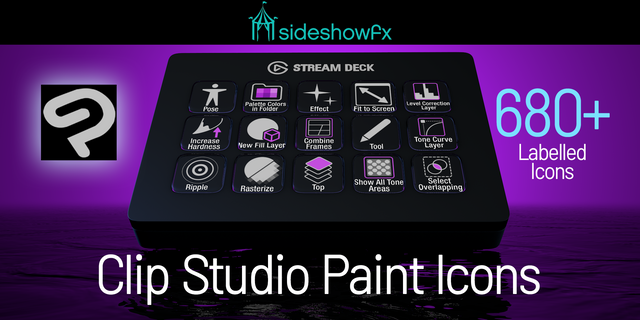
403 XL COMMANDS • 389 MK COMMANDS • 680+ ICON DESIGNS IN FOUR STYLES
Built for Stream Deck XL & MK1/MK2 • Mac & Windows • English QWERTY keyboard required
Transform your Stream Deck into a powerful Clip Studio Paint creative control surface, with hundreds of preprogrammed shortcuts and professionally organized profiles designed for digital artists. Whether you're illustrating, painting or creating comics, keep your essential Clip Studio Paint commands within easy reach. Less time searching through menus. More time creating.
✨ HUNDREDS OF READY-TO-USE COMMANDS
Clip Studio Paint offers an extensive collection of creative tools. Remembering every shortcut shouldn't interrupt your artistic flow. Our preprogrammed profiles bring hundreds of commands directly to your Stream Deck, making your favourite tools and functions easier to access.
STREAM DECK XL
• 403 preprogrammed shortcut commands • 25 pages of organized controls • Dedicated Mac and Windows profiles
STREAM DECK MK1 & MK2
• 389 preprogrammed shortcut commands • 36 pages of organized controls • Dedicated Mac and Windows profiles
We've done the programming and organization. You focus on creating.
🎨 680+ CUSTOM ICON DESIGNS. FOUR VISUAL STYLES.
Give your Stream Deck a professional Clip Studio Paint-inspired appearance with over 680 custom-designed icons, each provided in four visual variations.
• Two-tone on black — labelled • Two-tone on black — unlabelled • Two-tone on transparent — labelled • Two-tone on transparent — unlabelled
That's more than 2,720 icon files, giving you the flexibility to personalize your Stream Deck's appearance. Choose a consistent visual style or mix and match to suit your workspace.
🖌️ DESIGNED FOR DIGITAL ARTISTS
From drawing and painting to illustration and comic creation, make your Stream Deck a convenient extension of your creative workspace. Keep commonly used commands at your fingertips so you can spend less time navigating menus and more time focused on your artwork.
⚙️ CUSTOMIZE YOUR CREATIVE WORKFLOW
Start with our ready-to-use profiles, then make them your own. Rearrange commands, personalize your layouts and organize your favourite Clip Studio Paint tools around the way YOU work. Custom keyboard shortcuts are included for Mac and Windows.
✓ WHAT YOU GET
✓ Stream Deck XL profiles — 25 pages, 403 programmed commands ✓ Stream Deck MK profiles — 36 pages, 389 programmed commands ✓ Mac and Windows profile versions ✓ 680+ custom icon designs in four visual styles ✓ 2,720+ icon files in total ✓ Custom keyboard shortcuts for Mac and Windows ✓ 27-page PDF manual ✓ Free lifetime updates for existing owners ✓ License for use on two computers
⚠️ BEFORE YOU BUY
• Compatible with Stream Deck XL, MK1 and MK2 • Mac and Windows supported • English QWERTY keyboard layout required • Custom keyboard shortcuts must be installed as directed in the guide • Clip Studio Paint must be installed separately • This is a preprogrammed profile pack, not the Clip Studio Paint application
TRY THE SAMPLER: https://www.dropbox.com/t/ERxTVD8twYmt7ZXf
PDF GUIDE: https://www.sideshowfx.net/s/CSP-Pro-Stream-Deck-Preview-V10.pdf
SIDESHOWFX — PREMIUM STREAM DECK WORKFLOWS. HANDCRAFTED & ENGINEERED SINCE 2019.
No release notes for this version
Version 1.0.2
Jan 18, 2024
Details
Type
Productivity
Device
Stream Deck MK
Stream Deck XL
OS
macOS
Windows
Compatibility
Stream Deck 6.4 or later
Size
37.11 MB
Version
1.0.2
Support
Icons
Yes
Additional links
You might also like