Development
Codex Usage Monitor
by Status Check
Overview
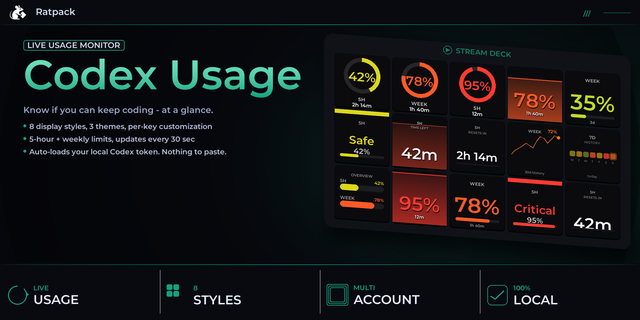
Codex Usage Monitor is an unofficial local Stream Deck plugin that shows current Codex usage directly on a Stream Deck key. It uses the existing local Codex login to request usage data from ChatGPT, then displays remaining or used percentage for the 5-hour and weekly Codex usage windows.
The key refreshes automatically at a configurable interval and can also be refreshed manually by pressing the key. Display modes include dual bars for both quota windows, a ring gauge, a warning tile, and a split-key view. Single-window modes can show the lowest remaining window automatically or be locked to the 5-hour or weekly window.
Users can configure visual mode, remaining/used percentage basis, refresh timing, threshold colors, reset countdown labels, optional Spark/model-specific limit display, and optional mood indicators. Mood indicators and pulse behavior can be turned off, or left enabled so the key changes status more frequently as remaining usage gets low.
The plugin includes clear status screens for first-run and error states, including Login Codex, Auth Expired, Network Retry, and API Changed.`
Disclosure:
This plugin is unofficial and is not affiliated with OpenAI. It reads the local Codex auth file and sends authenticated usage requests only to OpenAI/ChatGPT. Tokens are not displayed, logged, or sent to the plugin author.
Optional support note:
This plugin is free. If it saves you time, optional support is welcome.
https://buymeacoffee.com/statuscheck
Adds banked-reset visibility, current-usage applicability, a positive R# key indicator, and a fifth display-only Reset Details layout reduced to a readable count and expiration date. Also refines the quota layouts, adds exact 12 or 24-hour timing, improves the Property Inspector status card, and rerenders cached visual changes without another network request.
Version 0.1.12
Aug 25, 2026
Details
Type
Development
OS
Mac
Windows
Compatibility
Stream Deck 7.1 or later
Size
137.85 KB
Version
0.1.12
Language
English
Support
Profiles
No
Dial support
No
Additional links
You might also like