Smart Home
Dashboard for Plex Pro
by Dead Syntax
Overview
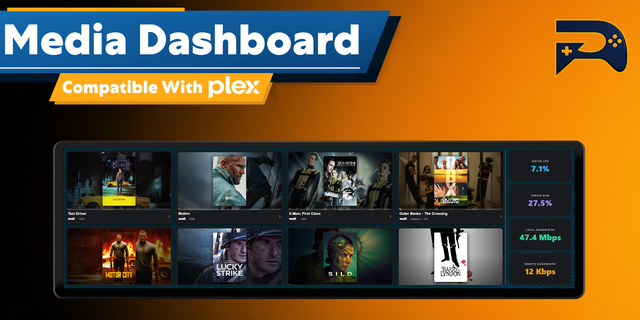
Dashboard for Plex Pro puts live server information, active playback sessions, recently added media, library management, and maintenance controls directly on your Stream Deck.
Connect your Plex account, select a server, and build a customized dashboard using dynamic keys and Stream Deck+ dials. Information refreshes automatically.
What’s Included:
Seamless Plex Setup
Sign in securely using Plex’s browser-based authorization
Automatically discovers accessible Plex Media Servers
Switch between accessible servers from the property inspector
Server Overview
View server name, address, and connection status
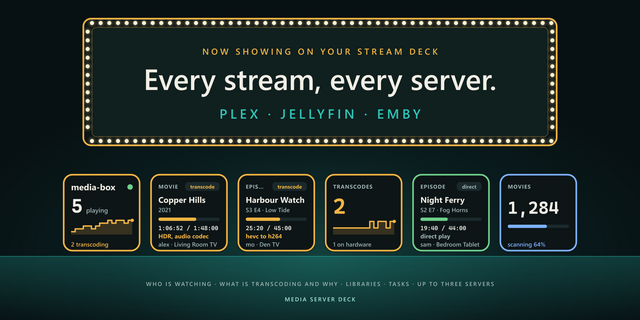
Monitor active stream, transcode, and direct-play counts
View estimated stream bandwidth and active library scans
Move between Identity, Streams, and Activity pages
Active Streams
Browse every active playback session
View artwork, viewer name, title, episode or year, and playback progress
See playback method, including Direct Play and Transcode
View video, audio, subtitle, bandwidth, and LAN/WAN details
Recently Added
Browse the three newest items across supported libraries
Display full-key artwork and media titles
Refresh Libraries
Scan all libraries or a selected library for new and changed media
See current scan status directly on the key
Empty Library Trash
Requires permission to manage the selected Plex library
Empty trash for an individual library
Remove unavailable media entries from the Plex database
Optimize Database
Requires administrative access to the selected Plex Media Server
Start Plex’s asynchronous database optimization operation
Compact the database and reduce fragmentation
Stream Deck+ Dials
Server Overview Dial — Browse Identity, Streams, and Activity pages
Active Streams Dial — View artwork, media details, playback method, video, audio, subtitle, and bandwidth information
Recently Added Dial — Display full-width artwork for the newest media
Refresh Libraries Dial — Scan libraries and view current scan status directly on the screen
Customization
Customize the appearance of each individual key and dial action
Choose built-in theme presets or create and save your own
Customize backgrounds, labels, main values, secondary text, indicators, counters, progress bars, and other action-specific elements
Adjust text size, label style, overflow behavior, and scrolling speed
Preview changes with representative sample data before saving
Reset individual settings or restore an action to its default appearance
Dynamic artwork, status indicators, counters, and page indicators update automatically
Requirements
A Plex account with access to a running Plex Media Server
Administrative permissions for applicable server and library management actions
Stream Deck+ is required for dial actions
Privacy
Authentication tokens, server details, library metadata, and playback-session information are processed locally. The plug-in has no telemetry and uses no developer-operated backend. Data is sent only to Plex authentication services and Plex Media Servers selected by the user.
Disclaimer
This is an independent third-party plug-in and is not affiliated with, endorsed by, authorized by, or sponsored by Plex or Elgato. Plex is a trademark of Plex, Inc. Elgato and Stream Deck are trademarks of their respective owners.
Functionality relies on Plex authentication services and Plex Media Server interfaces. Features may change or stop working if Plex modifies, restricts, or removes third-party access. The plug-in is provided as-is without warranties of availability, compatibility, fitness, or uninterrupted operation. Users are responsible for their Plex accounts, server access, backups, and use of administrative actions.
Expanded Appearance Studio with reliable, name-first custom preset creation from Classic defaults, live preset swatches, rename and delete controls, and stable preset persistence.
Custom presets now remain selected while editing and save dial-icon and dial-screen colours back to the same reusable template. Existing controls retain their previously saved appearance when a template changes or is deleted.
Built-in presets now clearly show per-control changes as Modified and restore those saved changes when revisited in the same Studio session.
Simplified Dial Icon customization to icon and background colours only, with consistent preset selection and colour Reset behavior.
Corrected Refresh Libraries Dial prompts so PRESS TO SCAN uses the configured Plex/label colour and PRESS TO CANCEL uses the scanning/danger colour.
Fixed preset state ordering and overlapping settings saves that could cause custom presets to disappear or briefly show stale colours.
Version 1.2
Jul 15, 2026
Details
Type
Smart Home
OS
Mac
Windows
Compatibility
Stream Deck 7.1 or later
Size
1.91 MB
Version
1.2
Language
English
Support
Profiles
No
Dial support
Yes
You might also like