Gaming
Deadlock Shop - Multi-Device
Overview
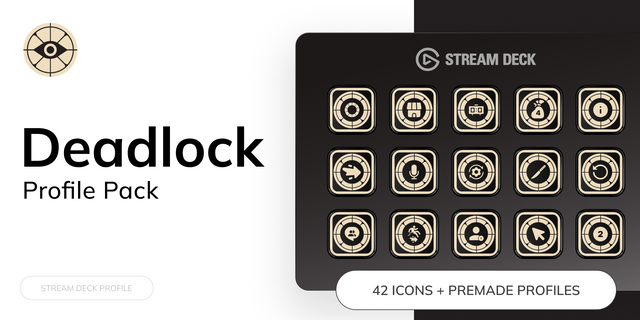
Transform your Stream Deck into a dedicated shop controller for Deadlock. Deadlock Shop — Multi-Device provides ready-to-use profiles that make browsing, buying, selling, and managing items faster, without relying on mouse coordinates or repetitive manual shop navigation.
The package organizes the shop into Weapon, Vitality, Spirit, and Legendary sections. Each Stream Deck receives a layout adapted to its number of keys, with PREV/NEXT controls, category access, visual item identification, and navigation designed for its available screen space.
FOUR OPTIMIZED PROFILES IN ONE PACKAGE
One purchase includes dedicated profiles for:
• Stream Deck XL • Stream Deck 15-Key • Stream Deck Neo • Stream Deck Mini
Pages, folders, shortcuts, and navigation are arranged for each device so the experience remains practical on both large and compact models.
CORE FEATURES
• Buy supported Weapon, Vitality, and Spirit items directly from your Stream Deck. • Sell supported items using a hold-to-sell interaction to help prevent accidental sales. • Browse items by category and tier through organized pages and folders. • Access category shortcuts throughout the profiles. • Use device-specific PREV/NEXT navigation. • Select INFUSE ability slots 1–4 for compatible items. • Identify items marked as ACTIVE, INFUSE, or both. • Access Legendary actions intended for supported Deadlock test environments. • Launch Deadlock, Steam, or Discord from the Home page. • View the required F7 console reminder directly from Home.
HOW IT WORKS
Deadlock Shop uses an included lightweight companion component to send commands through Deadlock’s developer console. The profiles provide the visual interface, item pages, folders, navigation, and device-specific layouts. Install the companion component first, then install the profile matching your Stream Deck.
The solution is command-based and does not use automated mouse coordinates. When a supported item key is pressed, it opens the developer console, enters the corresponding command, confirms it, and returns control to the game.
INSTALLATION OVERVIEW
Install the included Deadlock Shop companion component.
Install the profile for XL, 15-Key, Neo, or Mini.
Enable the developer console in Deadlock and assign it to F7.
Select the profile in the Stream Deck application.
Test a standard item purchase before entering a match.
A detailed installation guide is included. You only need to install the profile matching your device, although all four are included.
SYSTEM REQUIREMENTS
• Windows 10 or later • Stream Deck application 7.4 or later • Stream Deck XL, 15-Key, Neo, or Mini • Deadlock installed through Steam • Developer console enabled and assigned to F7 • Included companion component installed
IMPORTANT INFORMATION
Standard Weapon, Vitality, and Spirit actions are designed for supported gameplay conditions and remain subject to Deadlock’s item rules, currency, shop location restrictions, and current behavior.
Legendary actions use commands intended only for supported test or sandbox environments. They are not intended for official competitive matches and may not work where Deadlock restricts those commands.
Deadlock is an evolving game. Item names, internal commands, shop structure, console behavior, or availability may change through future updates. A product update may be required if Valve changes these systems.
This product does not automate aiming, movement, combat, gameplay, or decision-making. Every action must be triggered by the user. It is a Stream Deck shop-control interface for supported item commands.
Deadlock Shop — Multi-Device is an independent, unofficial third-party product created by TheSetupMaker. It is not affiliated with, authorized by, sponsored by, or endorsed by Valve Corporation, Steam, or Elgato. All related names, trademarks, artwork, and logos belong to their respective owners.
Version 2.0 refreshes the artwork for all 173 Deadlock items.
Updated Weapon, Vitality and Spirit category buttons and lettering, with matching custom Legendary artwork. ACTIVE and INFUSE labels now appear just above item names.
Includes updated profiles for Stream Deck XL, 15-Key, Neo and Mini. Item purchases and sales continue through the developer console assigned to F7.
Install the included companion plugin (2.0.0.1), then import the updated profile for your device. Existing users must reimport their profile.
Requires Windows 10 or later, Stream Deck 7.6 or later, and Deadlock installed through Steam. Legendary actions are intended for supported test environments.
Version 2
Oct 6, 2026
Details
Type
Gaming
Device
Stream Deck + XL
OS
Windows
Compatibility
Stream Deck 7.1 or later
Size
40.05 MB
Version
2
Language
English
Support
Icons
Yes
Dial support
Yes
You might also like