Business
DNS Deck
by TeaTime
Overview
DNS Deck
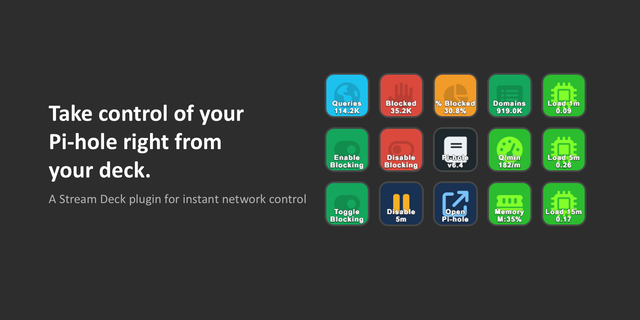
Your network's ad blocker on your Stream Deck. DNS Deck works with Pi-hole (v6 and v5), AdGuard Home, Technitium DNS Server and Blocky: see whether blocking is on, pause it when a site will not load and watch the day's numbers, for up to four servers.
The keys
Protection: ON, OFF or the time left on a pause, with the server's name. Press to turn blocking back on. Turning it off takes a second press within three seconds.
Pause: 30 seconds, 5 minutes, 30 minutes, an hour or a time you choose, counted down on the key. Press again to resume. The server ends the pause itself, even if your computer is off.
Pause all: every server paused with one press, with each one's state. Press again to resume them all.
Stat: queries, blocked, blocked %, clients, the top blocked domain or the response time.
Blocked bar: blocked % as one bar across up to four keys side by side.
Lists & cache: update the block lists now, or flush the DNS cache, with one press.
The ring round every key shows the state from across the room: cyan blocking, amber paused, coral off.
Five kinds of server
Pi-hole v6: every key except Lists & cache. Numbers over the last 24 hours; response time is the upstream average.
Pi-hole v5: protection, pause, the numbers for today and the top blocked domain. No response time; the countdown shows for pauses set from the deck.
AdGuard Home: every key except Lists & cache. Numbers over its statistics period; clients from its top list.
Technitium DNS Server: protection, pause in whole minutes, the numbers over the last 24 hours, and Lists & cache. No response time.
Blocky: protection, pause and Lists & cache. The numbers need its statistics turned on; with only its Prometheus metrics you get counts since it started, without the top domain.
Lists & cache works on Technitium and Blocky only. Where a server cannot report something, the key says "not on" that server, never a made-up zero.
Servers A to D
Set up to four servers, of any kind, under Servers in any key's settings; each key picks one.
DNS Deck works out which kind each server is by itself.
With more than one server, each key carries a small chip with its server's letter and type.
Stream Deck +
Turn a Stat dial through the numbers, push to pause or resume that server, tap the strip to read it again.
The touch strip shows the state and the pause countdown.
Says what is wrong
Not set up, connecting, can't reach (and why), wrong password or token, an untrusted certificate: each is named on the key.
After a wrong password it asks only once a minute, so the server does not lock you out.
A server that goes quiet keeps its numbers for 30 seconds, greys out, then says it can't be reached, and recovers on its own.
Private by design
It talks only to the servers you enter, on your own network, over their own APIs. No account, no cloud, nothing installed on the server.
Passwords and tokens stay in Stream Deck's settings on this computer. Use an app password for Pi-hole v6 and an API token for Technitium.
Self-signed certificates are refused unless you tick "Trust this server's certificate".
The log records states and counts, never an address, a password or a domain.
Unofficial: DNS Deck is not affiliated with Pi-hole, AdGuard, Technitium or Blocky. Pi-hole, AdGuard, Technitium and Blocky are names and trademarks of their respective owners.
DNS Deck 1.0.1
First release.
Works with Pi-hole v6 and v5, AdGuard Home, Technitium DNS Server and Blocky, up to four servers at once (A to D), each found by itself.
Protection: ON, OFF or the pause countdown; turning blocking off takes a second press.
Pause for 30 seconds to an hour or your own time, and Pause all for every server at once, each shown by its letter.
Stat keys for queries, blocked, blocked %, clients, the top blocked domain and response time, and a Blocked bar across up to four keys.
Lists & cache: update block lists or flush the DNS cache on Technitium and Blocky.
Stream Deck + dials that turn through the numbers and pause with a push.
Keys say plainly what is wrong, and "not on" a server that cannot report a number.
Version 1.0.1
Oct 6, 2026
Details
Type
Business
Monitoring
Smart Home
Utilities
OS
Windows
Compatibility
Stream Deck 7.1 or later
Size
205.82 KB
Version
1.0.1
Language
English
Support
Profiles
No
Neo Infobar support
No
Dial support
Yes
Additional links
You might also like