Creative Tools
Epic Pen Profile
by PackRat 🐀
Overview
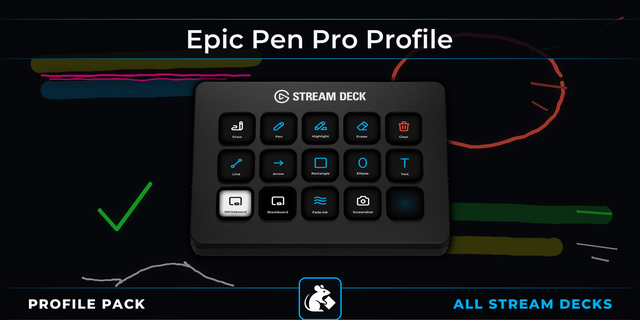
Epic Pen Stream Deck profile: pen, highlighter, eraser, clear, undo, stroke size, screenshot and quick colors on real keys.
Epic Pen turns your screen into something you can draw on. This profile puts every tool it ships with on a labeled Stream Deck key, so you mark up what you are showing without dragging the floating toolbar around or trying to remember a chord.
Works on Stream Deck MK.2, Stream Deck XL, Stream Deck + and Virtual Stream Deck, for Windows.
*Point at the screen and the mark is already there.*
**Tools** - Pen, highlighter, eraser and clear, plus undo and the cursor key that hands control back to whatever is underneath.
**Colors** - Six quick colors on their own keys, and a last color key to jump back to what you were using.
**Stroke size** - Thicker and thinner on two keys, or on a dial if you have a Stream Deck +.
**Screenshot** - Capture the annotated screen without leaving what you are doing.
**Zero setup** - Every key sends an Epic Pen default shortcut, so it works the moment you import it.
Requires Epic Pen for Windows. Works on Stream Deck, MK.2, XL, Stream Deck + and the Virtual Stream Deck.
---
Part of the Packrat profile collection for Stream Deck. Game decks, streamer decks and editing decks, all on the marketplace at @packrat.
Epic Pen, Stream Deck profile, screen annotation, teaching, presenting, whiteboard
improvements based on user feedback
Version 1.0.1
Sep 2, 2026
Details
Type
Creative Tools
Productivity
Device
Stream Deck +
Stream Deck MK
Stream Deck XL
OS
Windows
Compatibility
Stream Deck 7.1 or later
Size
103.04 KB
Version
1.0.1
Language
English
Support
Dial support
Yes
Icons
Yes
You might also like