Gaming
FiveM Animations | PEAK RP
Overview
Control your FiveM character animations on PEAK ROLEPLAY directly from your Elgato Stream Deck. No typing, no chat commands, no menus during gameplay.
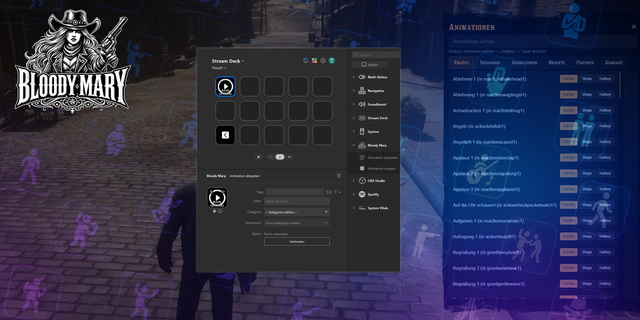
This plugin lets you assign your favourite animations to numbered slots in the in-game animation menu, then map each slot to a Stream Deck key. One press plays the animation instantly.
INCLUDED ACTIONS
Play Animation Press a key to instantly play the animation assigned to that slot. The button title updates automatically to show the animation name once FiveM is connected.
Stop Animation Cancel any currently playing animation with a single button press.
HOW IT WORKS
Open the in-game animation menu on PEAK RP.
In the sidebar you will find the "Stream Deck" section.
Click "Add slot" and choose an animation.
Drag the "Play Animation" action onto your Stream Deck and enter the slot number.
Press the button to play, done!
You can create as many slots as you like. Everything is managed in-game, no manual animation dictionary or clip IDs required.
TECHNICAL DETAILS
The plugin runs a local WebSocket bridge on 127.0.0.1. The companion FiveM resource (installed on the PEAK RP server) connects via NUI and forwards each command to the game. All communication stays on your local machine.
LOCALIZATION
The plugin is fully localized in English and German (Deutsch).
Release Notes — v1.0.1
FiveM Animations | PEAK RP
Control your FiveM character animations on PEAK ROLEPLAY directly from your Elgato Stream Deck.
Features:
Play Animation: Assign animations to numbered slots in the in-game menu, then trigger them instantly from your Stream Deck.
Stop Animation: Cancel any currently playing animation with a single button press.
Auto-Title: Button titles update automatically to show the assigned animation name once FiveM is connected.
Slot System: Unlimited animation slots, fully managed in-game. No manual dictionary or clip IDs required.
How it works:
Open the in-game animation menu and assign animations to Stream Deck slots.
Drag the "Play Animation" action onto your Stream Deck and enter the slot number.
Press the button to play, done!
The plugin communicates via a local WebSocket bridge (127.0.0.1). Nothing leaves your machine.
Localization:
English
German (Deutsch)
Version 1.0.1
Apr 22, 2026
You might also like