Business
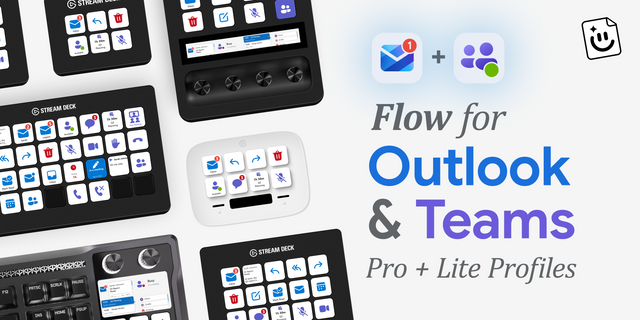
Flow for Outlook & Teams
by FlowKits
Overview
📬 Outlook & Microsoft Teams for Stream Deck plugin (and profiles!). Your inbox and emails, calendar, and Teams presence, live on your Stream Deck.
Stay on top of emails and work in Microsoft Outlook and Microsoft Teams without breaking your focus. Outlook & Teams turns your Stream Deck into a live command surface for business email, meetings, and Teams presence, so you act in one tap instead of digging through windows ⚡
--
✅ Live unread email count, refreshed automatically. Know what is waiting without alt-tabbing.
✅ Set your Microsoft Teams status to Available, Busy, or Do Not Disturb with one tap.
✅ Countdown to your next meeting, then join it from the same key.
✅ Works on Windows PC and Apple Macintosh (macOS).
🔑 Heads up: if you're on a work account, your IT admin may need to approve access on their end first. This is standard for Microsoft 365 setups. If you're part of a government entity running GCC High or DoD, the plugin won't connect, since those run in Microsoft's separate government cloud. GCC Moderate can work if your admin approves access.
--
📥 Built for Power Users
Run multiple Microsoft accounts side by side and watch them all at a glance. Dedicate keys to a specific sender, a saved search, or a folder.
📨 Inbox, Sender, and Search monitors with live counts on every key.
👀 Email Preview shows the latest sender and subject right on the key.
🗂️ Account and folder overviews across every connected mailbox.
🔎 Press to open the exact email or search in Outlook on the web.
--
⚡ Act Without Switching Windows
✍️ Compose a new email in one tap.
📩 Mark the latest message, or a whole folder, as read.
📂 Jump straight to any Outlook folder.
📅 See your next meeting with a countdown and join it, or browse your agenda on a dial.
--
💬 Microsoft Teams, In Reach*
🟢 One-tap presence: Available, Busy, Do Not Disturb, Away, Be Right Back.
💬 Send a preset message to a person or a channel without opening Teams.
📊 See your unread Microsoft Teams chat count at a glance.
*Teams features require a Microsoft 365 work or school account. Email and calendar work with any Microsoft account.
--
🎯 Protect Your Focus
⏳ Focus Timer flips you to DND for a set time, then restores your status automatically.
🔕 Your status does the talking, so colleagues know when to wait.
--
🔒 Private by Design
Everything runs locally on your device. FlowKits has no servers and never sees your mail, messages, or sign-in tokens. You sign in once with Microsoft, no app passwords, and your tokens are encrypted at rest using Windows or macOS secure storage. Published by a Microsoft-verified developer.
--
🖥️ Works on Every Stream Deck
Stream Deck Mini, Stream Deck Neo, Stream Deck MK.2, Stream Deck +, Stream Deck XL, Stream Deck Plus XL and Galleon 100 SD. Dedicated LCD dial screens light up on Stream Deck + and Stream Deck Plus XL for scrolling your inbox, reading email, browsing your agenda, and dialing your Teams status. Fully compatible with Windows and macOS.
--
📦 What's Included
✅ 27 Outlook, calendar, and Microsoft Teams actions for keys and dials.
✅ Built-in themes, including Outlook and Teams Light and Dark, plus full color control.
✅ One-click sign in, Microsoft verified publisher. Tokens encrypted locally on your device.
✅ Setup guide at https://getflowkits.com/setup/microsoft-outlook-teams-stream-deck/
--
🎯 Perfect For
Professionals and business teams who run their day in Microsoft Outlook and Microsoft Teams. Power users juggling multiple inboxes who would rather stay in flow than babysit email.
--
Disclaimer
Independent FlowKits product, not affiliated with or endorsed by Microsoft. Microsoft, Microsoft Outlook, Microsoft Teams, and Microsoft 365 are trademarks of the Microsoft group of companies, used solely to identify compatibility.
New Date & Week key. It shows today's date with the calendar week underneath, like a page from a desk calendar. Signed in, it also shows how many meetings you have this week and how much time they take. You choose how weeks are numbered (Europe, United States, or Monday from January 1) and can change the label, so "KW 43" works too. Press it to open Outlook on this week.
Some corporate security software was shutting the plugin down. After a few rounds of that, Stream Deck stopped loading it until you reinstalled. That's fixed, and you stay signed in.
"Press opens" is on every Outlook key and dial. It used to appear on only five of them, so if your keys weren't among those five, every press opened Outlook on the web with no way to change it.
Picking New Outlook explains why it can't open a specific folder. Web and Classic still open the exact folder you chose.
The Teams Status Message key uses Teams purple, like the rest of the Teams keys.
Version 1.4
Oct 21, 2026
Details
Type
Business
Productivity
OS
Mac
Windows
Compatibility
Stream Deck 7.1 or later
Size
5.86 MB
Version
1.4
Language
English
Support
Neo Infobar support
No
Profiles
No
Dial support
Yes
You might also like
-thumbnail-optimized-70c35d7a-a6e5-40ab-9ea7-e94ae4542f3f.png)