Artistic
FreeCAD macOS Studio Pro
Overview
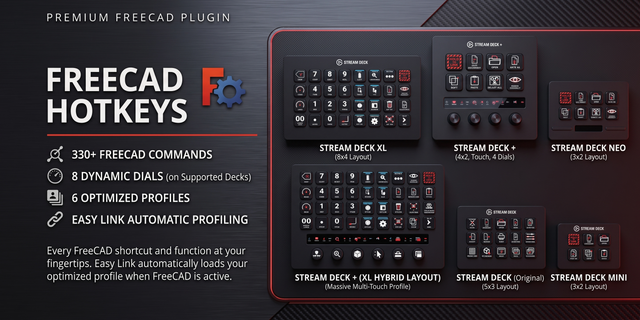
Hold the Easy Link key while FreeCAD is in front and the link is made: the deck follows the app you are in, on Windows and macOS. Eight dials drive history, zoom, view roll, selection, workbenches, documents, views and draw styles, and all 330 default FreeCAD 1.1 keyboard shortcuts sit on real keys across 27 categories.
ON A MAC
Elgato Stream Deck needs two permissions in System Settings > Privacy & Security. Accessibility: if a key reads "Allow Accessibility", turn Elgato Stream Deck on there, then restart the Stream Deck app. Automation: if keys only alert, allow Elgato Stream Deck to control System Events there. Keys send FreeCAD's macOS shortcuts (Command for Ctrl); six that cannot be sent safely, F11 and Cmd+Space among them, alert instead.
EASY LINK, BUILT IN
Nothing else to install. Hold the key about a second while FreeCAD is in front to bind it to this plugin's profile. The profile switches in whenever FreeCAD takes focus: leave it and your previous profile returns.
EIGHT DIALS
The Stream Deck + profile seats four dials, the Stream Deck + XL six:
- History: undo and redo, press to save.
- Zoom: in and out, press to fit all.
- View Roll: a quarter turn, press for isometric.
- Selection History: step through your picks, press to go to one.
- Workbench: turn to choose, press to switch.
- Documents: move between open documents.
- Standard Views and Draw Style: seven views, seven draw styles.
Each dial paints its own strip art and tap zones.
LIVE STATE
Undo, Redo and Save light only when FreeCAD says they are available. Run the bundled FreeCADHotkeysBridge macro once for live faces: true undo depth with the next step's name, the document starred while unsaved, real workbench, view and draw style names, and a Record Selection reminder. On a Mac every live reading comes from this macro.
THE THEME KEY
One press restyles FreeCAD's windows, panels and 3D view live: Void, Graphite and Neon Grid are three dark color ways, My theme puts your own look back, and Cycle steps through all four. The key ships on every bundled profile. The first press installs the theme packs in your FreeCAD 1.1 settings folder, never in the install folder. Needs FreeCAD 1.1 running.
THE NUMBER PAD
The Stream Deck + XL and Stream Deck XL hubs carry a 14-key number pad that stays put while you page: digits, 00, decimal point, Backspace and Enter, with undo and redo beside it. Pad keys click on press; swap any sound or switch them off.
WHAT'S INCLUDED
27 categories matching how FreeCAD works: the Std workbench split by function, the Sketcher across six pages, Draft, BIM, Arch, Assembly, FEM, CAM and Extras. Every command ships with its own key illustration in the plugin's Neon Glass style.
MULTI-KEY SEQUENCES, ONE TAP
FreeCAD binds most tools to chord sequences like G,C for a circle or W,8 for Part Design: 212 of the 330 commands, each fired from a single key.
PER-KEY SOUNDS
Every command key can play a sound on press, or stay silent. Sounds you record with our free Sound Sampler appear in the Key Sound picker.
SIX BUNDLED PROFILES
One per deck, each with Easy Link, installed with the plugin: color-coded category hubs on the Stream Deck, Stream Deck XL and Stream Deck + XL (tap a category to land on its page, Home to return), the four dials and starter keys on the Stream Deck +, starter keys on the Stream Deck Mini and Stream Deck Neo.
HOW TO USE
Drag a category action onto a key, pick a command by its key face in the property inspector, and press with FreeCAD in front.
CUSTOM HOTKEYS
Remapped something in FreeCAD? Capture any combination in the Custom Hotkey field and the key sends that instead. Works in Multi Actions.
New in 2.0.0.0: FreeCAD macOS Studio Pro runs on Windows 10 or later as well as macOS 13 or later. One plugin, the same keys, dials and profiles on both.
Theme key: restyles FreeCAD's windows, panels, overlays and 3D view live with Void, Graphite or Neon Grid, My theme (your own look) or Cycle (the default). The first press installs the packs in your FreeCAD 1.1 settings folder, never the install folder, and your File > Open folder stays put. It sits on every bundled profile; on the Stream Deck +, Stream Deck Mini and Stream Deck Neo, on a second page, FreeCAD 2.
On a Mac, keys and dials send FreeCAD's macOS shortcuts, and the History dial's redo now reaches FreeCAD. Easy Link links FreeCAD and shows its icon. Six commands that cannot be sent safely alert instead, the Documents dial's forward turn among them. Elgato Stream Deck needs Accessibility and Automation in System Settings > Privacy & Security: if a key reads "Allow Accessibility", turn it on, then restart the Stream Deck app.
The dials follow one layout on both platforms: History, Zoom, View Roll and Selection History, plus Workbench and Documents on the Stream Deck + XL. Installed profiles keep their old pages until you remove them and let the plugin reinstall them.
The optional state macro is now FreeCADHotkeysBridge.FCMacro: if you ran the earlier one, run the new one once.
Version 2
Oct 21, 2026
Details
Type
Artistic
Business
Development
Productivity
OS
Mac
Windows
Compatibility
Stream Deck 6.9 or later
Size
4.8 MB
Version
2
Language
English
Support
Neo Infobar support
No
Profiles
Yes
Dial support
Yes
Additional links
You might also like