Artistic
Gallery Wall
by Magoo
Overview
Make your deck art.
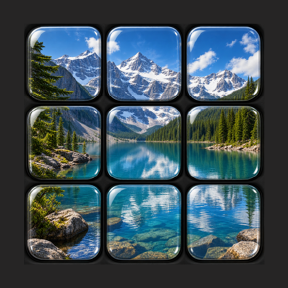
Gallery Wall transforms your Stream Deck into a synchronized photo display, turning multiple keys into one clean, customizable image wall. Build a visual centerpiece for your setup while keeping the shortcuts, hotkeys, text actions, and media controls you already rely on close at hand.
Create a Gallery Home key, add matching Photo Tiles around it, and let Gallery Wall split one image across your Stream Deck layout. Refresh the image when you want something new, lock a favorite photo in place, or black out the wall for a minimal look.
Highlights
Build a tiled photo wall across multiple Stream Deck keys
Use random images or choose a specific Lorem Picsum photo ID
Sync standard photo tiles with hotkey, text, and multimedia tile actions
Customize rows, columns, tile positions, grayscale, and blur
Refresh, lock, unlock, or black out your Gallery Wall from the home key
Create a more visual workspace without giving up everyday controls
Perfect for
Desk setups that deserve a more polished visual centerpiece
Creators who want their Stream Deck to feel more personal
Streamers, editors, designers, and productivity users who live on their deck
Anyone who wants useful controls that also look good
Gallery Wall is an independent Stream Deck plugin by Magoo Media. It uses images from Lorem Picsum via picsum.photos, but is not affiliated with, endorsed by, or sponsored by Lorem Picsum.
Release 1.0.0.0
This initial release delivers the first stable version of the app, including the core experience, polished interface, and baseline functionality needed for everyday use.
Highlights:
Introduces the main application workflow for creating, viewing, and managing content.
Adds a clean, responsive user interface designed for desktop use.
Includes foundational performance and reliability improvements.
Establishes versioning, packaging, and release readiness for future updates.
Fixes early usability issues found during testing.
This release marks the first production-ready build and sets the foundation for upcoming feature improvements.
Version 1
Sep 11, 2026
You might also like