Gaming
GameShelf
by Qaem
Overview
GameShelf — Your Whole Game Library for the CORSAIR XENEON EDGE
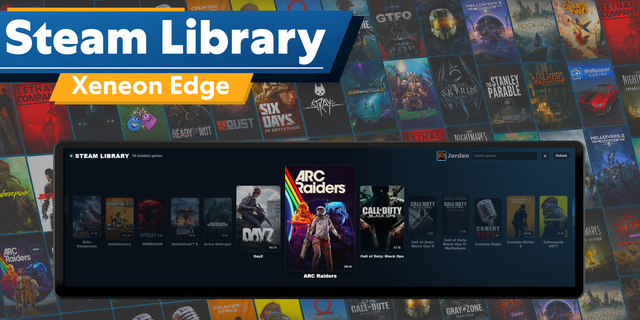
Every game installed on your PC, from every launcher, with its cover art, on your XENEON EDGE. Tap a game to play it.
Steam, Epic Games, GOG, Battle.net, the EA app, Ubisoft Connect, Xbox and Riot Games in one library, without opening a single launcher. No Stream Deck required.
Key Features:
One Library For Every Launcher
Every Installed Game: With its cover, backdrop and logo.
Your Launchers, Your Way: Filter by launcher, or give a copy one launcher only.
Sort: By recently played, name, most played or recently added.
Organize: Star favorites, make your own categories and hide what you don't play.
Playtime: When you last played each game and for how long. Where a launcher doesn't keep playtime on your PC, Qaem Hub times your sessions itself.
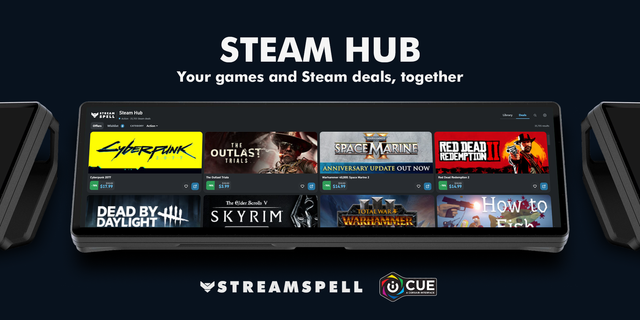
Steam Extras: Achievements and update progress.
One Tap To Play
Play: Tap a game to start it through its own launcher.
Now Playing: The game you're playing shows its session time and can be closed from the widget. Closing asks twice.
One Widget, Several Jobs
Widget Types: Add GameShelf more than once and give each copy a job in iCUE's widget settings: Everything, Recently played, Favorites or one of your categories, Now playing, or Continue with the last game you played.
Layouts: The whole library as a spotlight on your latest game, a showcase, a shelf of covers or a list.
Shared Library: Copies share favorites, categories and hidden games. Each copy has its own launcher, layout, colours and text size, in iCUE's widget settings or in the widget.
Requires Qaem Hub (Free Companion App)
Qaem Hub: GameShelf needs Qaem Hub, QaemDev's free companion app for Windows: qaemdev.com/products/qaem-hub. Its Games module reads each launcher's own files and starts games through the launcher they belong to. It never changes the launchers' files.
Just This Module: Rather not install Qaem Hub? Get the Games Module, a small app with only this module inside: qaemdev.com/downloads/games-module-setup.exe. Qaem Hub takes it over, settings kept, if you install it later.
Looks After Itself: Qaem Hub runs quietly in the tray, starts with Windows and keeps itself up to date.
Requirements
CORSAIR iCUE 5.45 or newer with a XENEON EDGE, on Windows.
At least one of: Steam, Epic Games Launcher, GOG (with or without GOG Galaxy), Battle.net, the EA app, Ubisoft Connect, the Xbox app, the Riot Client.
Notes
Cover art comes from each launcher and from public game databases, fetched to your PC for your own games.
Battle.net starts a game in one tap once its app is signed in. If it's closed, Qaem Hub opens it first.
Games whose anti-cheat forbids it (VALORANT, League of Legends) close from inside the game only.
On iCUE 5.51 and newer, allow the widget to reach 127.0.0.1 in iCUE Settings, Widget Access, if iCUE asks.
GameShelf is not affiliated with or endorsed by Valve, Epic Games, GOG, Blizzard, Electronic Arts, Ubisoft, Microsoft or Riot Games.
SETUP TAKES TWO MINUTES
Install Qaem Hub, add its Games module, and import the widget in iCUE. Your games are there.
SETUP GUIDE: https://qaemdev.com/guides/qaem-hub-setup
First release. Every game from every launcher on your XENEON EDGE, with its cover art: one tap to play through its own launcher, favorites, categories, playtime and a Now playing card, in five widget types. Needs Qaem Hub, the free companion app.
Version 1
Oct 6, 2026
Details
Type
Gaming
Utilities
Device
XENEON EDGE
OS
Windows
Size
46.84 KB
Version
1
Language
English
Support
Dashboard Sizes
Extra large
Large
Medium
Small
Recommended Orientation
Horizontal
Vertical
Interactive
Yes
Additional links
You might also like