Artistic
GIMP Hotkeys
Overview
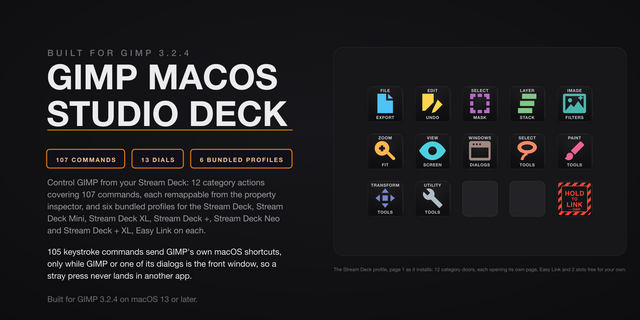
GIMP on your Stream Deck: 100 GIMP commands on real keys, 37 toolbox tools on the Stream Deck + touch strip, a number pad that types straight into GIMP's size and position fields, and dials for canvas zoom, undo, layers and brush size. Six bundled profiles, one for every Stream Deck model.
Requires the Stream Deck desktop app 7.5 or newer. Older app versions will not load this plugin.
THE NUMBER PAD
Eighteen keys that type. Digits 0 through 9, double zero, decimal point, minus, plus, Tab, Enter, Escape and Backspace, laid out like the pad on a full keyboard. Click into any GIMP field, a brush size, a layer offset, a canvas dimension, a scale percentage, and enter the value from the deck without reaching for the keyboard. Each key flashes when you press it, and each can carry its own sound.
THE TOUCH TOOL BAR
GIMP's toolbox on the Stream Deck + touch strip. Tap a tool, GIMP switches to it. Thirty-seven tools are wired, drawn as individual glyphs and spread across the touch screens so every target stays big enough to hit with a finger. The Stream Deck + pages them over two screens. The Stream Deck + XL fits them on one.
STREAM DECK PLUS DIALS
Four dials sit behind a single GIMP Dial action, so you place one dial and pick its job in the property inspector:
- Canvas Zoom: turn to zoom at your pointer, press for 100 percent, tap to fit the image in the window.
- Undo and Redo: turn clockwise to redo, counter-clockwise to undo, one step per click.
- Layer: turn to move the active layer up and down the stack, press for the top layer, tap for the bottom.
- Brush Size: turn to grow or shrink the brush while a paint tool is active. The dial accelerates: turn slowly for one size step per click, spin fast and each click moves more, so a big change is one flick.
Each dial paints its own art on the touch strip.
HOW THE KEYS WORK
Drop a category action onto any key and pick the command from a grid of key faces. The key instantly wears that artwork, so your deck reads at a glance. Press it and the shortcut lands in GIMP exactly like a physical keyboard.
READY-MADE LAYOUTS
Six bundled profiles, one per device: Stream Deck, Stream Deck Mini, Stream Deck XL, Stream Deck +, Stream Deck Neo and Stream Deck + XL. Every profile arrives with its first page filled, not half empty. The larger decks open on the number pad beside a colour-coded category hub, one page per category behind it, all 100 commands pre-wired and a Home key on every page. The Stream Deck + XL adds a six-screen tool bar page.
EASY LINK
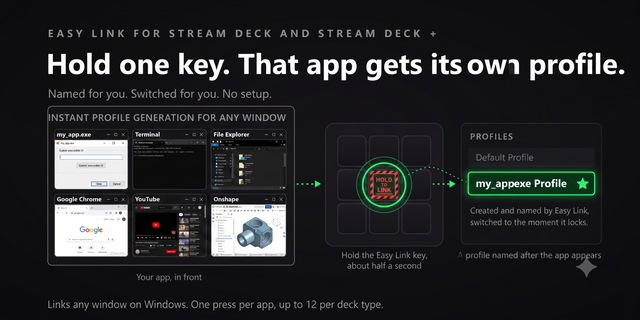
Hold the Easy Link key while GIMP is in front and the deck links GIMP to this plugin's profile. It comes up whenever GIMP takes focus, and your previous profile returns when you leave. A short press deliberately does nothing, so a stray tap never relinks. This links per device, so each deck you own carries its own GIMP profile. Nothing extra to install: the module is part of the plugin.
PER-KEY SOUNDS
Every key can play a sound the moment you press it, with 41 bundled: clicks, toggles, confirms and Easy Link capture cues. Pick one per key, or leave it silent. Pairs with our free Sound Sampler, so any sound you record on your PC shows up in the picker automatically.
YOUR SHORTCUTS, NOT OURS
Every key ships with GIMP's stock default shortcut, and every key is remappable. Customised your shortcuts inside GIMP? Give the key the same combination: type it in, or click Capture and press it once. Ctrl+Shift+E, Shift+Backspace, Num.1 and bare keys such as P or Space are all understood.
BUILT FOR GIMP 3 ON WINDOWS
Keystrokes reach the active window with real key-hold timing, the injection shape GIMP's GTK toolkit actually listens for, so shortcuts land in the canvas and in dialogs alike. The plugin never steals focus and never targets a window. Keys go wherever your keyboard would.
Windows only. Requires the Stream Deck desktop app 7.5 or newer, and GIMP 3. Runs entirely on your PC, with no account and no cloud service.
GIMP Hotkeys 3.0.1.0: easier key setup plus Easy Link and reliability fixes. Still 100 commands, four dials and six bundled profiles, for GIMP 3 on Windows.
Pick by face: a command key's settings now show the command list as a grid of the key art, so you choose by what the key will show.
Fixed: a custom hotkey captured with an arrow key or a numpad operator (+, -, *, / or .) never fired. Capture now stores those keys in a form the plugin can send; capture any such hotkey set before this update again.
Easy Link: the linked key now shows the app's icon above its name when one can be read, and its settings show each link's face. A failed link plays a shorter chime. Easy Link is now a key action only and can no longer sit on a dial; if you put it on one, move it to a key. The bundled profiles always had it on a key.
Easy Link on more than one deck: the Stream Deck app installs one new profile at a time, so linking several decks at once could leave all but one on its old profile. Each extra deck now comes up about 12 seconds after the one before, once per deck (and once more after this update).
Fixed: a key pressed while the keystroke helper restarted after a slow start could fail with the alert mark. A refused profile switch from Open Category or Back no longer stops the plugin. Helper processes now start in your temp folder, so they cannot hold the plugin's folder open during an update. The Open Category settings now name Home and the decks it works on.
Version 3.0.1
Oct 13, 2026
Details
Type
Artistic
Development
Productivity
OS
Windows
Compatibility
Stream Deck 7.5 or later
Size
4.69 MB
Version
3.0.1
Language
English
Support
Neo Infobar support
No
Dial support
Yes
Profiles
Yes
Additional links
You might also like