Development
GitHub Graph
by Caleb Leigh
Overview
Your GitHub contribution graph, right on Stream Deck
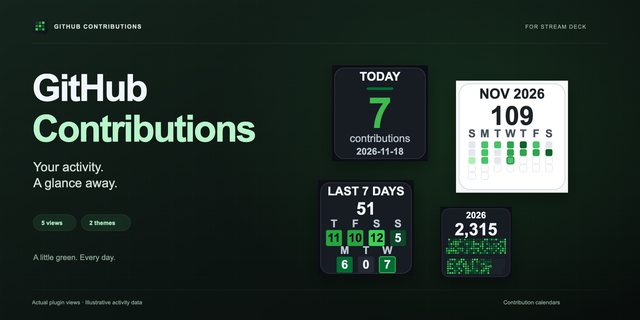
GitHub Graph puts your contribution history on the touch display so you can check your coding activity at a glance. It pulls data from the GitHub API using a Personal Access Token and shows both public and private contributions.
What's included:
Contribution graph (touch display, single dial). Rotate the dial to switch between time ranges: 7 days, 14 days, 4 weeks, 8 weeks, this week, and this month. Press to refresh. Tap to open your GitHub profile in the browser.
Full-width contribution graph (touch display, all 4 dials). Place Slots 1 through 4 left to right for an edge-to-edge view of your entire year. Slot 1 controls settings and the other three follow automatically. Rotate Slot 1 to change the year.
Streak counter (key). Tracks your current and longest contribution streak with animated flames that grow the longer you keep it going. Eight tiers: spark, kindling, flame, blaze, inferno, phoenix, legendary, and eternal. Supports daily, weekday-only, and weekly streak modes. Grace days let your streak survive if you skip a day.
Contribution stats (key). Shows total contributions for the year with a freshness indicator so you know how recent the data is.
Daily goal (key). Set a daily contribution target and watch a progress ring fill up. Hit the goal and a celebration animation plays.
Settings: All settings auto-save. No save button needed.
Two themes: daylight and midnight
Refresh interval: 5, 10, 15, 30, or 60 minutes
Month and day labels on or off
Streak alert time: pick an hour (for example, 6 PM) and the key changes color if you have not contributed yet
Grace days: choose how many skip days per week are allowed without breaking your streak
Compatibility:
Touch display actions (contribution graph, full-width graph) require Stream Deck + (or any other Stream Deck devices with this capability)
Key actions (streak counter, stats, daily goal) work on any Stream Deck model
Stream Deck software 6.9 or later
macOS 13+ or Windows 10+
A free GitHub Personal Access Token (Classic) with read:user scope is required. Setup instructions are inside the plugin settings.
Good to know:
Data refreshes on a timer you choose (default 15 minutes). This is not a live feed.
Private contributions show up when you use your own token.
The full-width graph uses 4 dial slots. You can use fewer, but it looks best edge to edge.
Initial worldwide release! Now back to shipping..
Version 1
Feb 6, 2026
Details
Type
Development
OS
Mac
Windows
Compatibility
Stream Deck 6.9 or later
Size
2.27 MB
Version
1
Language
English
Support
Profiles
No
Dial support
Yes
You might also like