Utilities
Gitlab runners status
by thongj
Overview
🤖 GitLab Runners Status — Stream Deck Plugin
Purpose: Monitor GitLab CI/CD runner health directly from physical Stream Deck buttons, with one button per runner.
🚀 Core Features 🚀
Status Display (auto-refresh)
The refresh time is adjustable
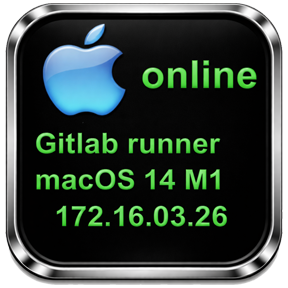
Each button shows a dynamically rendered icon indicating the runner's status
Icon varies by OS platform: Windows, macOS, Linux (with online/offline variants)
Overlaid text shows: runner name and GitLab status (online, paused, offline)
Status colors: green (online), yellow (paused), red (other)
Key Press Action
Pressing a button opens a remote desktop connection to that runner by its IP address:
Only works when the runner's IP is known and platform matches the host OS
Property Inspector (Settings UI)
Enter a GitLab project URL + private token (glpat-...)
Click "Get Runners" to fetch all runners for that project via the GitLab API
Search/filter runners by name or ID
Select a runner from the dropdown to assign it to the button
"Clear Data" resets all stored credentials and runner data
🎁Special: If runner description is set by this format: "test_agent_ (xxx.xxx.xxx.xxx)", button will show:
Platform icon on top left
Agent number on top right
IP address
Status
Pressing button directly opens remote connection to agent by IP
Add a text box to configure the refresh interval for runner status.
Add search box for runner selection.
Add function support manual add runner id and IP address.
Version 1.0.0.1
Mar 30, 2026
Details
Type
Utilities
OS
Mac
Windows
Compatibility
Stream Deck 6.9 or later
Size
14.87 MB
Version
1.0.0.1
Language
English
Support
Profiles
No
Dial support
No
You might also like