Productivity
GPT Deck Pro
by Kuberstar
Overview
ChatGPT on every key, and the answer comes back.
With GPT Deck Pro, send any highlighted or copied text to ChatGPT straight from Stream Deck, then get the reply on your clipboard with no copy-paste round trip. No more switching windows. No more retyping prompts. Now, translate, summarize, fix, explain, or ask anything with a single key press.
Key actions include:
Ask ChatGPT: send your own prompt plus the selected or copied text.
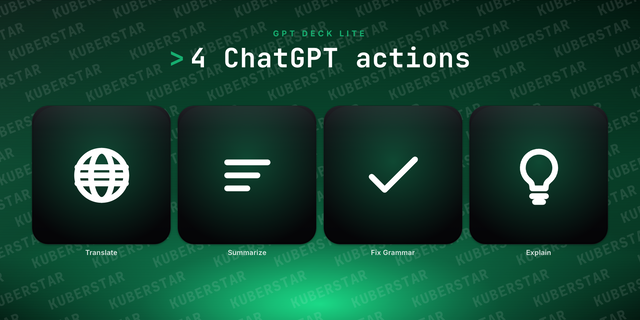
Translate: turn the selected text into another language.
Summarize: condense long text into a few clear sentences.
Fix Grammar: clean up spelling and grammar, keeping your tone.
Explain: get a clear, simple explanation of anything.
Self-check: diagnose the experimental App mode in one press.
Beyond the free GPT Deck Lite, Pro adds the customizable Ask ChatGPT key, editable prompts, the reply on your clipboard, OpenAI API mode, model switching, background sending, and interactive prompts you fill in at press time.
Every key sends through your browser by default (Web mode), or through the OpenAI API with your own key (API mode). A third, experimental mode drives the ChatGPT desktop app directly; that app has no automation API, so an OpenAI update can break it.
Requirements:
A browser signed in to chatgpt.com (Web mode, the default). An OpenAI API key for API mode.
Optional: the ChatGPT desktop app, for the experimental App mode.
macOS 13 or later, or Windows 10 or later.
Stream Deck 6.9 or later.
Web is now the default way to send. New keys open chatgpt.com in your browser, which needs no permissions and nothing installed. API mode is unchanged.
ChatGPT desktop app mode is now marked experimental. That app has no automation API, so GPT Deck has to drive it with simulated keystrokes, and an OpenAI update can break it without warning. Pick it from Send via if you want it.
Works with the new ChatGPT desktop app. OpenAI now ships a rebuilt desktop app next to the classic one, and both call themselves "ChatGPT". GPT Deck picks the right one and lands your prompt in a plain chat instead of a coding task.
App mode now tells you when a send did not land instead of reporting success. Previously a keystroke that macOS dropped looked exactly like a successful send.
API mode now defaults to GPT-5.6, replacing the retired GPT-4o. You can still type any model your key allows.
Model switching only works with the classic ChatGPT app; on the new app you pick the model in its composer, and GPT Deck now says so instead of silently doing nothing.
Self-check reports on each ChatGPT app you have installed, against the automation each one actually offers.
Version 1.1
Jul 13, 2026
Details
Type
Productivity
OS
Mac
Windows
Compatibility
Stream Deck 6.9 or later
Size
198.15 KB
Version
1.1
Language
English
Support
Profiles
No
Dial support
No
You might also like