Development
Grok Usage Deck
Overview
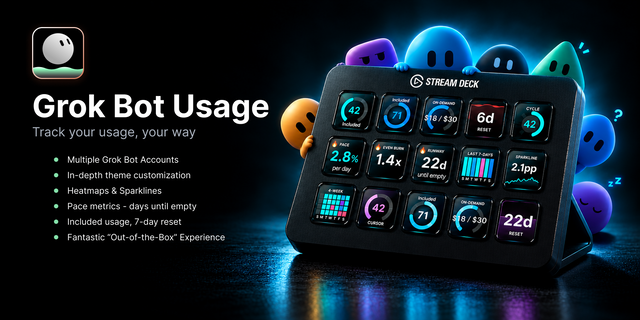
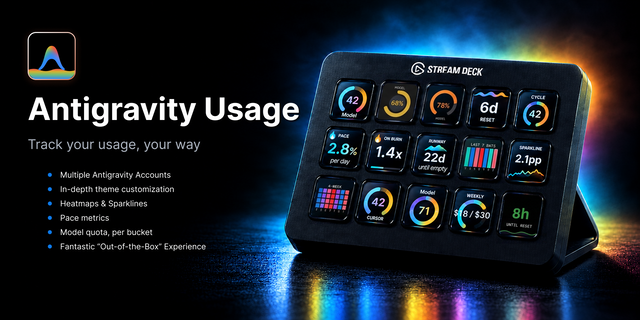
Track every Grok account side by side on your Stream Deck - each styled its own way - plus 9 key types, 6 key faces, and pace keys that show your burn rate against the time left in each window. Not another usage ticker. All metrics are accurate, verified and puts YOU in control of style, layout and how you operate within your dashboard.
🎨 Make it yours - 12 theme presets (now including Paper and Night) x 6 key faces (bar, pill, donut, ring, sparkline, heatmap) - 70+ looks before you touch an override. Per-key title, colors, and background overrides included.
👥 Accounts with separate looks - name each account, point any key at it, and theme it differently. Styles can be tied to each account! One click applies a look to ALL keys.
📈 3 pace projections - average % per day, burn vs even pace, days until empty - plus heatmaps and sparklines that show the trend, not just the level.
📊 10 key types: Standard Queries, Reasoning Queries, DeepSearch Queries, SuperGrok Weekly Limit, On-Demand (new plans; per-mode counts like "38 left"), a Cycle key, Reset Countdown (pick which window), and the 3 pace keys.
🎛️ Stream Deck + dials - Cycle Metrics, Pace: Heatmap, and Pace: Sparkline also run on Stream Deck + and + XL dials, using the same settings as the key. The reset countdown reads as one big number (like 23h or 42m), or days + hours if you prefer.
🔔 Alerts on your terms - set Watch, Risk, and Critical alert thresholds where you want them, or use pace-based mode that adapts to the time left in the selected window.
🧪 Try before you connect - demo mode paints sample data with no cookie. Long-press any key opens grok.com.
Requirements
- Stream Deck 7.1+; Windows 10 or macOS 12+
- Requires a Grok account. Reads your own rate limits via a grok.com cookie pasted locally or via Grok CLI or CLI token. Cookie stays 100% local. Unofficial API.
- Not affiliated with or endorsed by xAI.
🙏 My commitment
Built and maintained by a developer who uses it daily. Feedback goes straight into the roadmap - bug reports and feature requests encouraged.
✳️ I hold every plugin I release to a high bar, and honest feedback is part of how it gets raised. If something feels off, I want to hear it.
MORE COMING!
Want one for your provider? It's likely already in development! Message me for info.
Stay tuned for more updates - Lots coming! 😎
Keywords: Grok, SuperGrok, xAI, Grok CLI, SpaceXAI, Stream Deck, Stream Deck Plus, Stream Deck dials, usage monitor, usage tracker, weekly limit, rate limit, Reasoning, DeepSearch, on-demand, productivity, developer tools
Each account now has a Plan setting. On the new plans you get a Weekly limit (WEEKLY), per-mode counts like "38 left", and a new On-Demand key. On a legacy plan On-Demand says "Not enabled". The rolling window now reads "2h rolling" instead of a countdown that never lands. Weekly failure states now show on the key and follow the weekly window.
DIAL SUPPORT!! Cycle Metrics, Pace: Heatmap and Pace: Sparkline now work on Stream Deck + and + XL dials. A dial uses the same settings as the key. Press in the dial to activate a "Pro" mode, use the dial to scroll through historical usage data!
The reset countdown now shows one big number in a single unit, like 23h or 42m. If you want the old look, turn on "Show days + hours".
Sparkline days with no usage now draw as 0 instead of a gap. The reset liquid on Cycle Metrics is full right after a reset and drains as the next one gets close. I also made the Paper theme's warning color easier to read.
You can now Sign in with Grok right from the key settings, and the deck renews that sign-in on its own, keeping it in your OS secret store.
Version 1.4
Nov 6, 2026
Details
Type
Development
OS
Mac
Windows
Compatibility
Stream Deck 7.1 or later
Size
2.17 MB
Version
1.4
Language
English
Support
Neo Infobar support
No
Profiles
No
Dial support
Yes
Additional links
You might also like