Development
Herdr Agents
by shinespark
Overview
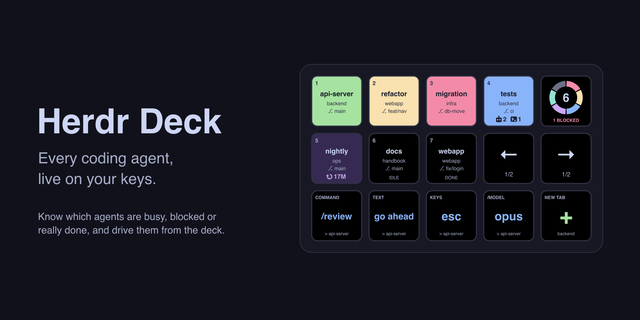
Show your Herdr coding agents on Stream Deck keys and act on them without leaving the deck. Each key shows an agent's repository, branch and state: working, idle, blocked or done. Press it to jump to that agent's pane. Requires macOS and Herdr.
Keep every agent in view
Agent Slot shows one agent per key. Drop a few keys side by side and they fill in with your agents in order, no setup needed.
Agent Summary counts agents in each state, in five looks. Press it to step through the agents that need you, blocked first.
Drive agents without switching windows
Slash Command and Send Text submit a command or a phrase you type often.
Send Keys sends key presses. Placed as is, it sends esc, so it works as an interrupt button.
Cycle steps through values on each press, such as /model opus → sonnet → haiku.
New Tab opens a tab in the directory of the focused pane, or in one you pick.
Every sending key goes to the agent you have focused, or to one you pin it to. The plugin talks to Herdr over its local socket, so it works with any agent Herdr can track, and nothing leaves your machine.
Available in English and Japanese.
Not an official Herdr or Elgato product.
Keys now update as soon as an agent changes state. Instead of polling Herdr every second, the plugin listens to Herdr's events and refreshes only when something happens, so state, branch and title changes appear right away and nothing is sent while things are quiet.
The plugin icon and the default key image have been refreshed with a >_ prompt in the middle, making it easier to tell what the plugin is for.
Version 1.1.1
Oct 14, 2026
Details
Type
Development
Productivity
Utilities
OS
Mac
Compatibility
Stream Deck 7.6 or later
Size
102.07 KB
Version
1.1.1
Language
English
Japanese
Support
Profiles
No
Dial support
No
Neo Infobar support
Yes
You might also like
MK.2(Mac)-thumbnail-optimized-c76e60fd-1bae-44e2-9604-bf0a21bdba3d.png)