Monitoring
Home Assistant Companion
Overview
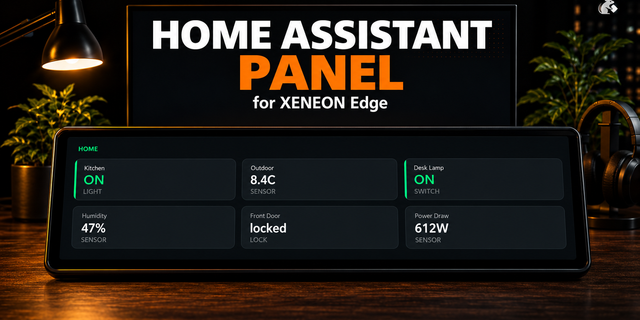
Control your smart home directly from your touchscreen with Home Assistant Companion, a customizable XENEON EDGE widget that provides quick access to your Home Assistant devices, entities, sensors, lighting, climate controls, locks, and custom actions.
While quality-of-life improvements and fixes are ongoing, the wide variety of smart-home products, integrations, and individual setups means compatibility and behavior may vary between users. Feel free to report or suggest things you'd like on our Discord.
Some Home Assistant devices or custom integrations may require manual configuration. With more testing, the experience will improve, be sure to report any feedback to our discord.
What’s Included Home Assistant Companion automatically detects supported entities from your Home Assistant installation and organizes them into a responsive, customizable dashboard.
Control lights, switches, smart locks, thermostats, fans, air purifiers, scenes, media devices, and other connected equipment. Compatible devices can display additional controls such as brightness sliders, color selection, temperature adjustment, HVAC modes, percentage values, status information, and multi-step options.
Cards can be resized, repositioned, and arranged freely across the dashboard. Different card sizes reveal additional information and controls while adapting their layout to the available space.
When automatic detection does not produce the desired result, programmable buttons, percentage sliders, and stepped sliders can be added manually using Home Assistant entity IDs and services.
Home Assistant Companion connects directly to your Home Assistant server using the local address and Long-Lived Access Token you provide.
Customization Personalize the dashboard through the iCUE configuration panel with custom backgrounds, transparency settings, header visibility, theme colors, refresh frequency, and typography controls.
Individual cards support customizable names, icons, artwork, primary and secondary colors, font colors, active-state colors, font sizes, control types, state wording, and advanced Home Assistant actions.
Cards can be dragged into custom positions and resized for compact, medium, large, horizontal, or vertical layouts. Your dashboard configuration is stored locally so your preferred layout and card settings can be restored between widget sessions.
Configuration Notice Home Assistant Companion is currently new. Home Assistant supports an extensive range of devices, integrations, entity types, and custom services, so automatic detection may not handle every configuration perfectly.
Users can manually configure card behavior when an entity is not detected correctly. Features, compatibility, interface behavior, and configuration options may change as development continues.
Disclaimer Home Assistant Companion is an independently developed product and is not endorsed by, sponsored by, or affiliated with Home Assistant, Nabu Casa, Corsair, or their respective subsidiaries.
Home Assistant, Corsair, XENEON EDGE, iCUE, and all related names, trademarks, logos, and intellectual property belong to their respective owners.
Users are responsible for maintaining lawful access to their Home Assistant installation, protecting their server credentials and access tokens, and securely configuring any devices or services connected to the widget. No copyright or trademark infringement is intended.
Version 2.3 - Major Update
Camera support has arrived.
Add individual feeds or multi-camera tiles.
Fullscreen viewing, framing, and support for pan, zoom, & tilt controls as well as listening on audio feeds.
Added a separate "on-state" and "off-state" appearance settings for tiles that are toggled.
Version 2.3
Oct 19, 2026
Details
Type
Monitoring
Smart Home
Device
XENEON EDGE
OS
Windows
Size
1.07 MB
Version
2.3
Language
Chinese (Simplified)
English
French
German
Italian
Japanese
Korean
Russian
Spanish
Support
Dashboard Sizes
Extra large
Large
Medium
Small
Recommended Orientation
Horizontal
Vertical
Interactive
Yes
You might also like