Audio
KiCad macOS Studio Deck
Overview
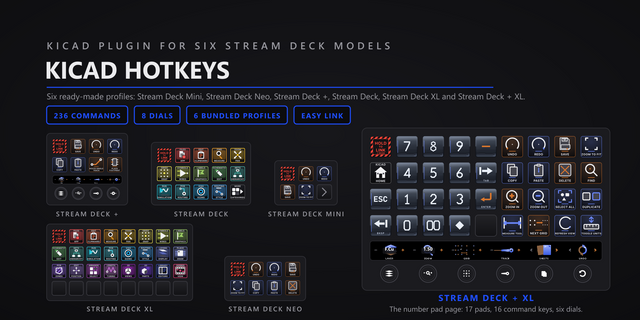
Hold the Easy Link key while KiCad is in front and the link is made: the deck follows the app you are in. Seven dial actions drive track width, via size, grid, layers, undo, sheets and layer opacity, and 235 KiCad commands sit on real keys across 23 categories covering the schematic editor, the PCB editor, the 3D viewer, the library editors and GerbView.
EASY LINK, BUILT IN
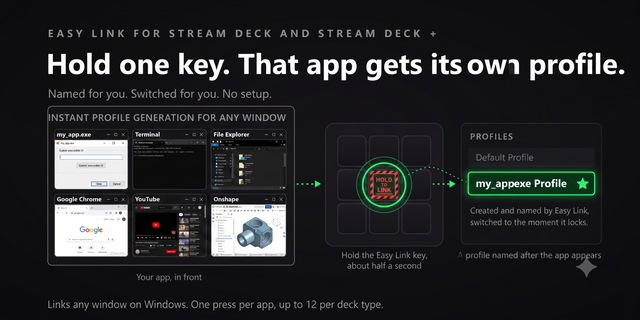
Nothing else to install. Hold the key about a second while KiCad is in front to bind it. The profile switches in whenever KiCad takes focus, and your previous one returns when you leave. Easy Link rides on every bundled profile.
SEVEN DIALS
The Stream Deck + profile seats four, the Stream Deck + XL six, and every dial paints its own face on the touch strip:
- Track Width and Via Size: turn to step KiCad's own size lists, with the value read live from KiCad's toolbar on the strip.
- Grid: turn to step the grid, with the live grid readout.
- Active Layer: turn to change copper layers. With KiCad's API server on (one checkbox in Preferences), the strip names the layer you are on and its neighbours either way.
- Undo Scrub: turn to undo and redo step by step, press to save. The strip counts the steps the dial issued.
- Sheet Navigator: turn to walk the schematic sheets, with the sheet rolodex on the strip.
- Layer Opacity: turn to fade copper layers. Ships assignable, so you can seat it anywhere.
Track, via and grid show the real value or a plain dash when there is nothing to read, never a guessed number: a stale width displayed as current is the same lie as a wrong one.
THE NUMBER PAD
The Stream Deck + XL and Stream Deck XL hub pages carry a 14-key number pad that stays put while you page: digits, 00, decimal point, Backspace, Enter. Type 12.5 into a size field without reaching for the keyboard. Each pad key clicks, and every key can play a sound you pick.
MEASURED, GATED, TRUTHFUL
Every chord this plugin sends was measured on a real KiCad on macOS. A command with no verified chord refuses on the key and tells you, because a wrong chord in a PCB editor succeeds quietly and changes your board. Commands proven to work in only one editor are gated to that editor, and their keys dim anywhere else. A Status key shows which editor is in front, the open project, and whether it has been edited since you opened it.
SIX BUNDLED PROFILES
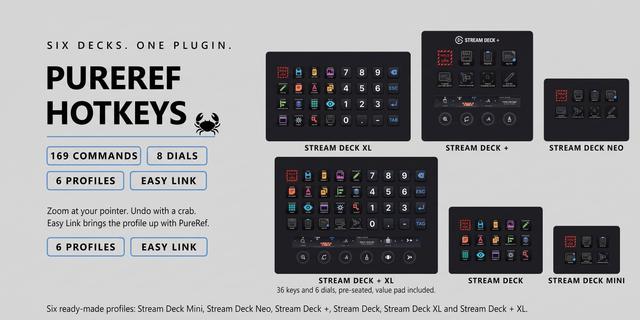
A ready-made profile for every deck installs with the plugin. The 15-key Stream Deck gets a 25-page hub of category doors. The Stream Deck + places four dials and starter keys. The Stream Deck + XL opens on the hub with six dials and the pad. The Stream Deck XL, Stream Deck Mini and Stream Deck Neo have their own profiles too.
HOW TO USE
Drag a category action onto any key, pick a command in the property inspector (the key art follows), and press with KiCad in front. Every key is remappable.
SETUP ON A MAC
- Give the Stream Deck app Accessibility permission: System Settings, Privacy and Security, Accessibility. Keystrokes cannot reach KiCad without it.
- For named layers on the Active Layer dial, turn on KiCad's API server: KiCad, Preferences, Plugins, Enable KiCad API server. Everything else works without it; with it off the layer strip shows a dash.
REQUIREMENTS
macOS 13 or later, Stream Deck app 6.9 or newer, and KiCad 10 (built and measured against KiCad 10.0.5). Keystrokes go to the focused window, so keep KiCad in front. A handful of commands have no verified macOS chord yet: those keys tell you instead of firing quietly.
First release. KiCad macOS Studio Deck is built for macOS from the ground up, with every chord measured on a real KiCad 10.0.5.
WHAT YOU GET
- 235 KiCad commands across 23 categories, each on a key that shows what it does, covering the schematic editor, the PCB editor, the 3D viewer, the library editors and GerbView.
- Seven dial actions: Track Width, Via Size, Grid, Active Layer, Undo Scrub, Sheet Navigator and Layer Opacity. Track, via and grid show live values read from KiCad's own toolbar.
- Six bundled profiles, one per deck: Stream Deck, Stream Deck Mini, Stream Deck XL, Stream Deck +, Stream Deck Neo and Stream Deck + XL.
- A 14-key number pad on the big-deck hub pages, with its key click sounds shipping on.
- A Status key that reads live from KiCad: the editor in front, the open project, and whether it has been edited.
- Easy Link built in: hold the key with KiCad in front and the profile follows the app.
Version 1
Sep 2, 2026
Details
Type
Audio
Business
Development
Productivity
OS
Mac
Compatibility
Stream Deck 6.9 or later
Size
3.97 MB
Version
1
Language
English
Support
Profiles
Yes
Dial support
Yes
Additional links
You might also like