Krita Shortcut Profile
by Adx.cool
Overview
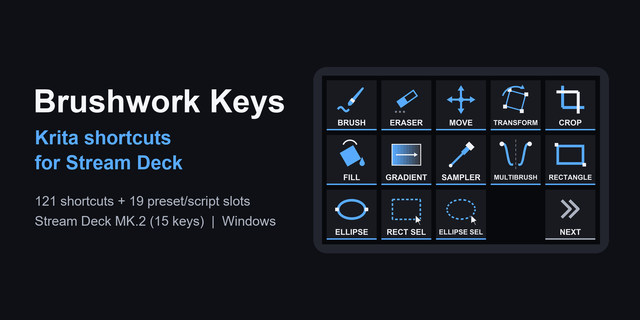
The complete Krita keyboard shortcut pack for Stream Deck.
126 shortcuts across 11 categories — organized, scored by importance, and ready to install on Stream Deck Classic / MK.2, XL. Stop memorizing key combos. One tap, one action.
What's included:
• Blending (28) • Layers (18) • View (16) • Painting (14) • Edit (13) • Panels (9) • File (8) • Select (8) • Filters (7) • Workflows (3) • Help (2)
Features: • Read from Krita's own action files, not from a wiki page • All 28 blending modes on one page, one tap each • Both platforms, with Qt's Ctrl-is-Command rule applied • Brush size, opacity and preset cycling without leaving the canvas • A distinct icon on all 126 keys
Install: double-click any .streamDeckProfile to import. The App binding is pre-filled to Krita — auto-activates on focus. If it didn't pre-fill, set it manually under Stream Deck → Preferences → Profiles → App.
Learn more about Krita: https://krita.org
Setup (required for some keys)
The blending page is the reason to buy this. Krita puts all 28 blending modes on Alt+Shift plus a letter — twenty-eight combinations nobody memorises. On a deck they become twenty-eight labelled keys, which is the whole point of the device.
Next and Previous favourite preset look swapped, and they are not. Krita binds comma to next and period to previous. That is what the source says; the labels follow the source, not intuition.
Add Paint Layer uses the Insert key. Apple keyboards do not have one, but the deck synthesises the keycode, so the key works on macOS anyway.
Krita reads Ctrl as Command on macOS. It is a Qt application and does not set the flag that would keep the two apart, so every Ctrl shortcut here is Cmd on a Mac. Only the Alt+Shift blending modes stay identical on both.
Quit is not included. Ctrl+Q closes Krita, and one tap on a deck is too easy for that.
First release. 126 bindings across eleven folders: File, Edit, View, Select, Layers, Painting, Blending, Filters, Panels, Workflows and Help.
This one was not transcribed. Krita is open source and declares its default shortcuts in two XML action files — krita/krita.action for the canvas, brushes, blending modes and layers, and krita/kritamenu.action for the File, Edit, View and Select menus. Both were read directly.
The second file is the one that matters. krita.action alone carries 79 bindings and no File or Edit menu at all — a profile built on it would have shipped without Save, Undo or Copy. Together the two files give 126 defaults, of which 122 ship here.
Left out: Quit, excluded as destructive; the tablet debugger, which is a developer tool; and two fill commands that the source lists twice, once under Edit and once under Painting.
Version 1
Aug 21, 2026
Details
Device
Stream Deck MK
Stream Deck XL
OS
macOS
Windows
Compatibility
Stream Deck 6.4 or later
Size
9.18 MB
Version
1
Language
English
Support
Icons
Yes
You might also like