Gaming
KSPDeck Lite
by TapVelocity
Overview
KSPDeck Lite brings core Kerbal Space Program controls and live kRPC feedback to your Stream Deck, giving you a focused entry point into hardware-assisted spaceflight.
*** Important: see Requirements below ***
Designed for players who want to try KSPDeck's telemetry-aware Stream Deck workflow, KSPDeck Lite includes essential flight controls for throttle, staging, SAS, RCS, time warp, vessel switching, and action groups. It is not just a static button pack: included actions connect to KSP through kRPC, update from live in-game state, and help your Stream Deck reflect what is actually happening in flight.
Lite is ideal for building a compact launch, ascent, and basic flight panel. Use tactile buttons for staging, RCS, SAS modes, brakes, gears, lights, custom action groups, warp controls, and vessel switching. On Stream Deck + and Stream Deck + XL, the included throttle dial gives you a more physical way to fine-tune thrust with live LCD feedback.
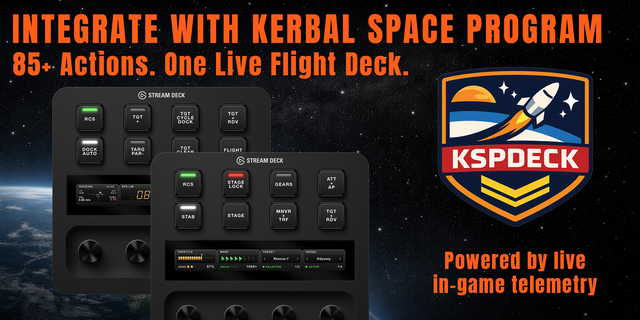
KSPDeck Lite is also a preview of the larger KSPDeck ecosystem. If you want the full mission-control experience, KSPDeck Pro expands far beyond the Lite action set with 85+ telemetry-linked actions, richer dial and LCD instruments, targeting and rendezvous controls, docking tools, deployable systems, advanced warp and vessel-selection dials, additional bundled profiles, and optional MechJeb autopilot integration.
Highlights
Core telemetry-linked KSP controls through kRPC
Live feedback for supported buttons and encoders
Throttle, warp, SAS, RCS, staging, and stage lock
Brakes, gears, lights, and configurable action groups
Basic vessel switching and profile navigation
Adjustable precision throttle control using dial with LCD feedback for your Stream Deck + or Stream Deck + XL
Bundled Lite profiles for Stream Deck Classic, Stream Deck +, and Stream Deck Mobile
A focused way to try KSPDeck before upgrading to KSPDeck Pro
Upgrade to KSPDeck Pro for the complete flight deck:
85+ telemetry-linked actions for Kerbal Space Program via kRPC
Targeting, rendezvous, docking, and vessel-selection workflows
Advanced dials and LCD instruments for warp, target selection, vessel switching, docking alignment, and autopilot tuning for your Stream Deck + or Stream Deck + XL
Optional MechJeb controls for SmartASS, maneuver execution, docking autopilot, vertical landing autopilot, and airplane autopilot
Expanded bundled profiles for launch, flight, attitude control, targeting, docking, maneuvers, landing, and atmospheric flight
Whether you are testing the waters or building a lightweight control panel, KSPDeck Lite gives you the essentials. When you are ready for deeper mission workflows, richer instruments, and autopilot integration, KSPDeck Pro is the edition built for the full KSPDeck experience.
A Stream Deck + or Stream Deck + XL is recommended for dial actions and LCD feedback, while standard Stream Deck devices can still use the included key actions.
Requirements: Kerbal Space Program and the kRPC mod.
KSPDeck Lite does not include these components and relies on user-installed mods.
This product is not affiliated with or endorsed by Private Division, Take-Two Interactive, the developers of Kerbal Space Program, or the maintainers of kRPC or MechJeb.
KSPDeck Lite 1.1 is here.
This first Lite release brings core Kerbal Space Program flight controls to your Stream Deck, with kRPC integration, live feedback, and a focused set of telemetry-aware actions for everyday launches, ascent, flight, and basic vessel management.
Included in v1.1
Core flight controls for throttle, warp, SAS, RCS, staging, and stage lock
Brakes, gears, lights, and configurable action group controls
Basic vessel switching and profile navigation
Live telemetry feedback for supported buttons and encoders
Adjustable precision throttle control using dial with LCD feedback for your Stream Deck + or Stream Deck + XL
Bundled Lite profiles for Stream Deck Classic, Stream Deck +, and Stream Deck Mobile
KSPDeck Lite is built as a lightweight entry point into the KSPDeck workflow. For the full cockpit experience, KSPDeck Pro adds the expanded 85+ action library, advanced dial and LCD instruments, targeting and rendezvous tools, docking workflows, richer bundled profiles, and optional MechJeb autopilot integration.
KSPDeck Lite 1.1 focuses on making the essentials of Kerbal Space Program feel faster, more tactile, and easier to access on Stream Deck hardware.
Version 1.1
May 5, 2026
Details
Type
Gaming
OS
Mac
Windows
Compatibility
Stream Deck 6.9 or later
Size
1.01 MB
Version
1.1
Language
English
Support
Profiles
Yes
Dial support
Yes
Additional links
You might also like