Development
Kuma Glance
by kirkanos
Overview
Keep an eye on your self-hosted services without opening a browser. Kuma Glance shows your Uptime Kuma monitors live on your Stream Deck – status, ping and uptime at a glance.
MONITOR KEYS
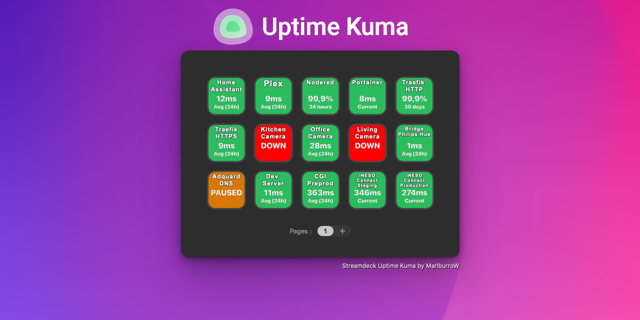
• Background color shows the status: up, down, pending, maintenance or paused
• Current ping, average ping (24h) or uptime (24h / 30 days) – press the key to switch
• A heartbeat strip with the latest checks, just like in the Uptime Kuma dashboard
• Optionally pause and resume a monitor with a key press
TAG SUMMARIES & TAG FOLDERS
• One key per Uptime Kuma tag with an up/down ring chart – it turns red as soon as something is down
• Press it to open a folder with a key for every monitor of that tag, with paging for large tags
• A press on a monitor opens its page in Uptime Kuma
DIALS
• On Stream Deck + and + XL: turn a dial to browse your monitors, the touch strip shows name, value and heartbeats
WORKS WITH
• Uptime Kuma 1.x and 2.x, including two-factor authentication
• Stream Deck, Mini, XL, Neo, +, + XL and Corsair Galleon 100 SD
• macOS and Windows
PRIVACY
Kuma Glance connects only to your own Uptime Kuma server. Your password is used once to log in and is never stored. No telemetry.
Ideal for homelabs, self-hosting, sysadmins and DevOps teams.
Unofficial plugin, not affiliated with the Uptime Kuma project.
Some improvements in visibility and version bumps, see https://github.com/kirkanos/kuma-glance/releases/tag/v2.2.2
Version 2.2.2
Oct 9, 2026
Details
Type
Development
Monitoring
Productivity
Utilities
OS
Mac
Windows
Compatibility
Stream Deck 7.1 or later
Size
134.4 KB
Version
2.2.2
Language
English
Support
Neo Infobar support
No
Dial support
Yes
Profiles
Yes
You might also like