Productivity
Launchify
by Qaem
Overview
Launchify — Your Apps, One Tap Away on the CORSAIR XENEON EDGE
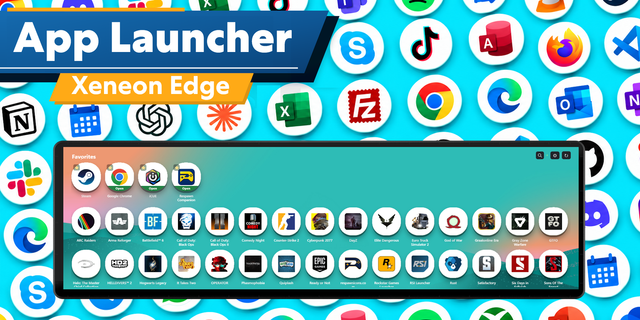
Turn your XENEON EDGE into a launcher that actually knows what your PC is doing. Every app you pin is a live tile: dim when it's closed, lit when it's running, ringed when it's the window you're looking at right now. Tap it to launch it. Tap it again to bring it forward.
No alt-tabbing, no hunting through the taskbar, no Stream Deck required. Pin your game, your browser, your chat app and your capture software once; then run your whole desk from the touchscreen beside it.
Key Features:
Live App Tiles
Real State, Not Guesses: Closed, running, minimized, sitting in the tray, or in front; read straight from the desktop's windows, several times a second.
Window Counts: "Running · 3" tells you how many windows an app has open, and a ×2 chip appears when it's running more than once.
Tray Apps Counted Too: Lightshot, Steam, a chat app you closed to the tray; no window to find, but Launchify still shows it as running.
Real Icons: Pulled from the exe itself at up to 128px and cached, so your tiles look like your apps.
One Tap Does The Obvious Thing
Closed → Launches It: Straight from the exe, with your own command-line arguments if you set any.
Running → Brings It Forward: Restores it from minimized and puts it in front, wherever it was.
In Front → Your Call: Minimize it (the default), open another window, close it, or do nothing.
Every Gesture Is Yours To Assign
Three Taps, Not One: A tap gets its own action for a closed app, a running app, and the app already in front.
Double Tap & Long Press: One action each — launch, focus, new window, minimize, close, force close, move to the next monitor, open the app menu, or nothing at all.
App Menu: Focus, New window, Minimize, Close app and Force close, plus rename the tile, add arguments, reorder, and remove.
Closing, With A Confirm You Can See
Two Taps, Clearly: The app turns red, says Close? and drains a bar for the couple of seconds it stays armed — a half-noticed tap can never take a window with it.
Force Close: Task Manager's End task, for the app that stopped answering. Its own confirm, its own colour, and both confirms can be switched off.
Built For More Than One Monitor
Where Everything Is: Each running app carries the number of the screen it's on — numbered the way Windows numbers them, so it matches your display settings.
Send It There: Tap another number in the app menu to move the app's windows to that screen. Maximized windows are restored, moved and maximized again on the new one.
Opens On: Pin where an app should start. Windows gives no say in that, so Launchify watches for the window and places it as it appears.
Next Monitor: Available as a gesture, so a double tap can walk an app across your screens.
Pin Anything In Two Taps
Running Now: Everything with a window this second, ready to pin.
Installed: Your whole Start Menu and Desktop, resolved to the real exe behind each shortcut.
Browse: Opens a real file picker on your PC for anything else.
Stays Open While You Work: Each row marks itself ✓ Added as you go, with an ✕ to take it back off — no trips back and forth.
Requires Qaem Hub (Free Companion App)
Qaem Hub: Launchify needs Qaem Hub, QaemDev's free companion app for Windows: qaemdev.com/products/qaem-hub. It runs Launchify's helper, which does the launching, focusing and moving that a widget can't do on its own.
Looks After Itself: Qaem Hub runs quietly in the tray, starts with Windows and keeps itself up to date. Already have the old Launchify Helper? Qaem Hub replaces it by itself and keeps your settings.
SETUP GUIDE:
https://qaemdev.com/guides/launchify-setup
No more permission pop-ups: the widget now declares the local Launchify address it connects to, so iCUE stops asking to allow it. Launchify now runs through Qaem Hub.
Version 1.0.2
Oct 23, 2026
Details
Type
Productivity
Utilities
Device
XENEON EDGE
OS
Windows
Size
29.37 KB
Version
1.0.2
Language
English
Support
Dashboard Sizes
Extra large
Large
Medium
Small
Recommended Orientation
Horizontal
Interactive
Yes
Additional links
You might also like
-thumbnail-optimized-6d8cabc4-0caf-4972-85eb-570890ca7c9b.png)