Artistic
LightBurn macOS Studio Deck
Overview
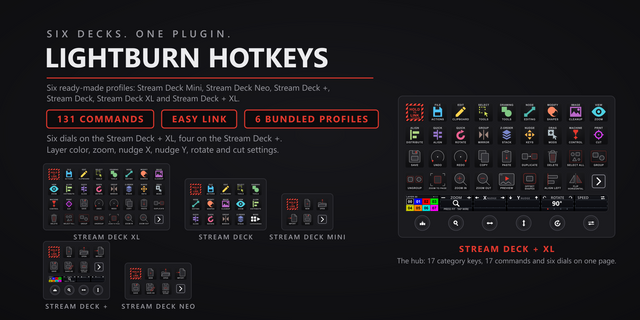
Control LightBurn 2.1.04 from your Stream Deck: 122 commands on 17 category keys, seven Stream Deck + dials for the moves you make on the design canvas all day, and a live LightBurn Status key. Every command is a real key with its own artwork: File, Edit, Selection, Drawing Tools, Node Editing, Modify Shapes, Images and Cleanup, View and Window, Align, Quick Align, Quick Rotate, Group and Mirror, Draw Order, Nudge, Drag Modifiers, Laser and Machine, and Print and Cut.
EASY LINK, BUILT IN
Easy Link: hold the Easy Link key for about a second while LightBurn is in front, and the deck switches to this plugin's profile whenever you come back to the app, then returns to your previous profile when you leave it. Nothing to install, no paths or window titles to type. A short press does nothing, so a stray tap never relinks. Easy Link sits on the top-left key of every bundled profile, with lock, fail and clear cues out of the box.
STREAM DECK + DIALS
Seven dials work on the artwork, never on the machine. Zoom: turn to zoom, press for zoom to page, tap the strip for wireframe. Rotate: turn to rotate the selection, press to cycle the step (90, 45, 15 or 1.5 degrees), shown live on the strip. Nudge X and Nudge Y: turn to nudge, press to cycle the step (normal, small, large), tap the strip to nudge once, hold it for Move to Page Center. Undo Redo: turn left to undo, right to redo. Layer Color: turn to browse all 32 cut layers on the strip, press to assign the highlighted one, the same as clicking it on the palette bar. Draw Order: turn to push the selection backward or forward, press for Push to Front, hold the strip for Push to Back. A Stream Deck + seats the first four; a Stream Deck + XL seats six on every page, Layer Color among them, Draw Order one drag away.
HOW THE KEYS WORK
Drop a category action on any key and pick the command in the property inspector. The key wears that command's artwork at once. Press it and the shortcut lands in LightBurn the way a keyboard would, through macOS accessibility. LightBurn comes to the front first if another app has it, and a key never fires into the wrong app. Drag modifiers are true hold keys: the modifier stays down while you hold the key and lifts when you let go.
STATE AWARE
The LightBurn Status key shows the machine connection (the device name, or No Machine) or the current document with its unsaved-changes flag, live on the key face, and refreshes on press. Every key checks that LightBurn is answering before it sends. Pause and Stop have no keyboard route in LightBurn for macOS and their keys say so.
BUNDLED PROFILES
Six bundled profiles, one per Stream Deck model: Stream Deck (19 pages: a two-page hub of category keys, then one page per category with every command pre-wired), Stream Deck + (1 page: seven starter keys and the first four dials), Stream Deck + XL (8 pages: a full hub of all 17 category keys and the most-used commands, a number pad, then category bands, six dials on every page), Stream Deck XL (9 pages of the same), Stream Deck Mini (2 pages of starter keys) and Stream Deck Neo (1 page of starter keys). Drop an Open Category action on any key and the profile installs on first press. The Stream Deck XL, Mini and Neo profiles are generated from the same command set but have not been tested on those devices, so treat their layouts as a starting point.
PER-KEY SOUNDS
Press feedback ships with 33 bundled sounds. Pick one per key in the property inspector, or leave it silent. Your own recordings in the shared Pathfinder Sounds folder show up in the picker automatically.
CUSTOM HOTKEYS
Changed a binding in LightBurn? Type the new combination in the Custom Hotkey field and the key sends exactly that instead. Works in Multi Actions for chained commands.
First release for macOS.
122 LightBurn commands on 17 category keys, seven Stream Deck + dials (zoom, rotate, nudge X, nudge Y, undo and redo, draw order, layer color), a live LightBurn Status key, Easy Link built in, six bundled profiles (one per Stream Deck model) and 33 bundled key sounds.
Keystrokes go through macOS accessibility to LightBurn only: a key brings LightBurn to the front first and never fires into another app. Pause and Stop have no keyboard route in LightBurn for macOS; their keys say so.
Requires the Stream Deck app 6.9 or newer. Built for LightBurn 2.1.04 on macOS 13 or later.
Version 1.0.0.1
Sep 14, 2026
Details
Type
Artistic
Development
Monitoring
Productivity
Utilities
OS
Mac
Compatibility
Stream Deck 6.9 or later
Size
3.53 MB
Version
1.0.0.1
Language
English
Support
Profiles
Yes
Dial support
Yes
You might also like