Productivity
MeetingPilot
by Dloper
Overview
MeetingPilot puts meeting controls, wrap-up timers and system audio within reach of your Stream Deck. Use one complete plugin for Microsoft Teams, Zoom and Google Meet on macOS or Windows.
KEEP THE CALL WITHIN REACH
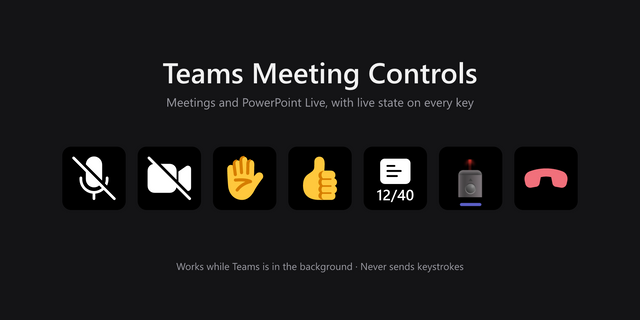
Add Smart Mute, Smart Camera and Leave Meeting to your keys. Automatic selection prioritizes Teams, then Zoom, then Meet; choose a specific service when you need to target a particular meeting. Optional double-tap confirmation helps prevent an accidental leave request. The meeting app may still ask you to confirm.
SEE THE TIME, KEEP YOUR FOCUS
Meeting Timer shows elapsed time and a countdown to the next half-hour/hour boundary or a fixed-duration deadline. Visual wrap-up reminders appear near five and two minutes remaining, followed by overtime feedback. Automatic timing follows detected calls; start a manual timer when detection is unavailable. Timers do not read your calendar or end calls automatically.
MAKE MORE OF YOUR HARDWARE
On Stream Deck +, rotate Smart Mute to adjust system output volume, push to toggle your meeting microphone and tap the touchstrip for the camera. A separate Output Volume action provides system volume and output mute. Stream Deck Neo's display-only Neo Meeting HUD keeps call and timer status in view; use ordinary keys for mute and camera.
A SECOND WAY TO CONTROL YOUR MIC
Enable hardware fallback when app-level microphone control fails, or choose hardware mode directly. It controls the operating system's default input. On macOS this uses CoreAudio input mute or verified master input-volume control where supported; on Windows it uses the default recording endpoint's mute control. A yellow lock identifies hardware mode. Confirm that the meeting app uses that input: devices and virtual audio routes can behave differently.
SET UP ONCE, CONTROL FROM YOUR DESK
Configure each action in Stream Deck. Teams' local API supports verified state where available and permitted. Zoom and Meet use supported application controls, browser automation or keyboard shortcuts. Unknown microphone and camera state remains visibly unknown instead of being presented as confirmed.
Requires macOS 13+ or Windows 10/11 x64 and Stream Deck 7.6+. macOS meeting controls require Accessibility/Automation permissions; macOS Meet requires Allow JavaScript from Apple Events and English in-call controls. Teams API availability depends on its version and organization. Keyboard fallbacks may bring the meeting window forward. App versions, interface languages and device capabilities can affect control and detection. Output volume is system-wide. No calendar integration or guaranteed control of every microphone is implied.
Version 1.1.0.0
- Improved Google Meet detection on macOS for more meeting URLs.
- MeetingPilot continues to check for in-call controls before showing an active meeting.
- New media assets.
Version 1.1
Nov 2, 2026
You might also like