Artistic
Microsoft Paint Commander
Overview
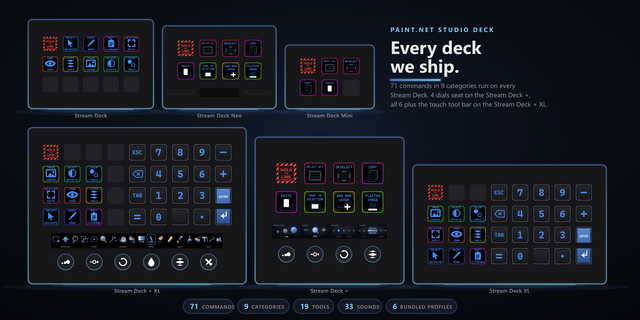
Microsoft Paint on real keys: 86 one-press commands and six live dials for your Stream Deck. The dials read Paint itself. Turn the Tool dial and the touch strip marks the tool Paint is actually holding, browse 23 shapes and 20 colours, then press to commit. Size, opacity and zoom ride their own dials.
SIX LIVE DIALS
- Brush Size: turn to change size, press to reset. The strip shows the size Paint holds right now, re-read after every change.
- Opacity: five percent per click, press for 100.
- Zoom: ten percent per click across Paint's full 10 to 1000 percent range, press for 100.
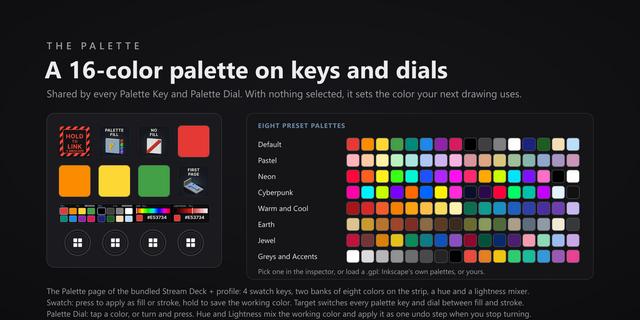
- Colour: a wheel of Paint's 20 palette colours. Turning browses without changing anything in Paint. Press to set Color 1.
- Tool: browse Paint's 8 tools, press to switch. The strip marks the tool Paint is actually using, so it stays right whether you switched from the deck, the toolbar or the keyboard.
- Shape: browse all 23 shapes, press to arm, then drag on the canvas.
The Stream Deck + seats four of the six dials on its encoders out of the box. The Stream Deck + XL seats all six. Every dial can be dragged onto any encoder.
HOW IT WORKS
Commands land in Paint through Windows UI Automation: keys press Paint's own buttons, menus and sliders by identity, not blind keystrokes fired into whatever window is in front. The plugin also reads Paint back. The status key and the dial strips follow the app, so what the deck shows is what Paint holds. When Paint is closed or a value cannot be read, the deck says so instead of guessing.
86 COMMANDS IN 10 CATEGORIES
Tools, File, Edit, View, Image, three shape categories covering all 23 shapes, and two colour categories for one-press swatches. Undo, redo, crop, rotate, flip, resize, zoom, fullscreen, rulers, gridlines, every tool, every shape, every palette colour. Each key wears purpose-drawn art, and live keys dim to show a measured no, never a failed guess.
Each key's settings show its category's commands as a grid of those faces, so you pick a command by what the key will look like. Every command key supports custom hotkey capture: press the Capture button in the property inspector, type your own combo, and the key sends that instead, so remapped setups keep working. Command keys also work inside Multi Actions. Optional key sounds too: 33 in the box, pick one per key.
A PROFILE FOR EVERY DECK
Six ready-made profiles ship in the box: Stream Deck Mini, Stream Deck Neo, Stream Deck +, the standard Stream Deck, Stream Deck XL and Stream Deck + XL. The big decks put two categories on every page with hub keys down both edges, so any category is one press away, never a page-flip tour. The 15-key deck gets a Home hub that jumps straight to any category page.
EASY LINK BUILT IN
Hold the Easy Link key while Paint is in front and the deck links itself to Paint: it switches to the Paint profile whenever Paint comes forward and returns to your previous profile when you leave. One press, no settings dialog, confirmation sounds included.
WHAT YOU NEED
Built and verified against Microsoft Paint 11.2605.81.0, the modern Paint app on Windows 11. Not the legacy Windows 10 mspaint and not Paint 3D. Works with the Stream Deck app 6.9 or later on Windows. Runs entirely on your machine: no account, no cloud, no telemetry.
FROM PATHFINDER PROTOTYPING
One of a line of deep control decks for creative and engineering apps, each built the same way: real commands verified against the real app, live readback where the app allows it, and profiles for every deck Elgato makes.
Microsoft Paint Commander 1.0.2.0. Still 86 commands, six dials and six bundled profiles; this release changes how keys are set up and how Easy Link behaves.
Pick by face: in a command key's settings, the command list is now a grid of the key art itself, so you choose a command by what the key will show.
Fixed: a custom hotkey captured with an arrow key or a numpad operator (+, -, *, / or .) never fired. Capture now stores those keys in a form the plugin can send. A hotkey captured that way before this update keeps its old value, so capture it again.
Easy Link: the linked key now shows the app's own icon above its name when one can be read, and the Easy Link settings list each linked app with the face it wears on the deck. A failed link plays a new, shorter chime. Easy Link is now a key action only and can no longer sit on a dial; if you put it on one, move it to a key. The bundled profiles always had it on a key.
Fixed: if the Stream Deck app refused a profile switch from the Open Category or Back key, the plugin could stop. The refusal is now caught and logged. The Open Category settings now name the decks it works on.
Helper processes now start in your temp folder, so they can no longer hold the plugin's folder open while the Stream Deck app installs an update. Also refreshed the shared Pathfinder input engine that sends keystrokes to Paint.
Works with Microsoft Paint 11.2605.81.0 and later on Windows 11.
Version 1.0.2
Oct 13, 2026
Details
Type
Artistic
Business
Development
Utilities
Video
OS
Windows
Compatibility
Stream Deck 6.9 or later
Size
2.44 MB
Version
1.0.2
Language
English
Support
Neo Infobar support
No
Profiles
Yes
Dial support
Yes
You might also like