Creative Tools
Moho 14 Pro for Stream Deck (Stream Deck+)
Overview
Run Moho from your Stream Deck + instead of hunting through menus - draw, rig,
pose and animate without breaking your hand off the pen.
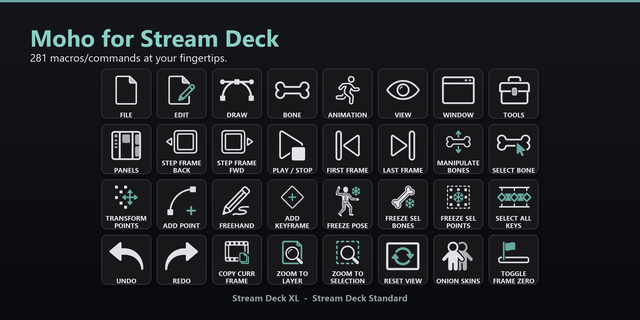
This is a complete profile, not a highlights reel. 281 commands are mapped to
clean, labeled buttons and arranged to MIRROR MOHO'S OWN MENU TREE: one key
opens Moho's menu bar as folders - File, Edit, Draw, Bone, Animation, View,
Window - plus Tools and Panels. If you know where a command lives in Moho, you
already know where it is on the deck. Nothing was invented and nothing was
regrouped.
The other seven keys keep the hot path under your fingers without a folder
trip: playback and frame stepping, the bone tools you live in, freeze and
keyframe selection. Longer menus continue onto Next pages, so nothing is left
out - a menu that does not fit on one screen simply carries on to the next.
FOUR KNOBS AND THE TOUCH STRIP.
The dial pack covers the actions that suit a knob better than a button. Knob 1
turns Undo and Redo and presses to Save. Knob 2 steps between keyframes, and a
press switches it to labeled keys. Knob 3 zooms the canvas, and a press
switches it to rotating the view. Knob 4 sets line width. That is four knobs
covering eight turn functions.
The touch strip above the knobs is custom artwork drawn for the strip itself,
at its native size rather than a square icon shrunk to fit. It always shows
what each knob is currently doing, and it changes the moment you press one, so
you never have to remember which mode a knob was left in.
INCLUDED SHORTCUT SET - please read this before buying.
Moho ships 149 of these commands with NO keyboard shortcut at all. A Stream
Deck button works by sending a keystroke, so those buttons need one to exist.
This product includes a ready-made Moho shortcut set that assigns every one of
them, plus a step-by-step guide to installing it. It takes about a minute.
The set is safe and reversible - Moho supports named, switchable shortcut sets,
so it is added alongside your own and never overwrites your shortcuts. You can
switch back at any time.
The remaining 132 buttons work immediately on Moho's own defaults, so the
profile is usable the moment you import it - but you will want the set.
This product is built for the Stream Deck + only.
Made for Moho. Not affiliated with, sponsored by, or endorsed by Lost Marble
LLC, the developer of Moho. All product names, logos and trademarks are the
property of their respective owners.
WHAT YOU CAN DO:
* Draw - Freehand, Add Point, Transform Points, shape and point tools
* Rig - bone tools, Manipulate Bones, Select Bone, binding, freezing
* Animate - Add Keyframe, Freeze Pose, Freeze Selected, keyframe selection
* Playback - step a frame, jump to first or last, play and stop
* View - Zoom To Layer, Zoom To Selection, Reset, Onion Skins,
Toggle Frame Zero
* Dials - Undo/Redo and Save, keyframe and labeled-key stepping, canvas
zoom and view rotation, line width
* Everything else - the full File, Edit, Draw, Bone, Animation, View, Window,
Tools and Panels menus, folder by folder.
REQUIREMENTS (list on the page)
-------------------------------------------------------------------------------
* Windows
* Stream Deck software (free from Elgato)
* Moho PRO 14. Moho Debut exposes far fewer commands and many buttons will
do nothing on it.
Made for Moho. Not affiliated with, sponsored by, or endorsed by Lost Marble
LLC. All product names and logos are property of their respective owners.
Icon fix.
* Rotate View Left and Rotate View Right now show a matched pair of arrows,
one turning each way. Previously both keys carried an arrow curving the same direction, so only their labels told them apart. No command, key assignment or layout changed - artwork only.
Version 1.0.1
Aug 25, 2026
Details
Type
Creative Tools
Device
Stream Deck +
OS
Windows
Compatibility
Stream Deck 7.1 or later
Size
3.07 MB
Version
1.0.1
Language
English
Support
AI Content
Yes
Icons
Yes
Dial support
Yes
You might also like