Utilities
Monitor Control
by same
Overview
DDC/CI brightness, contrast, input, color preset, volume, and power across every connected monitor — plus HDR, resolution and refresh-rate switching, software color temperature, window placement and lookup, audio output/input switching, virtual desktop, power plan, process priority, and per-app scene capture/restore. 29 actions for Windows.
DDC/CI core (10)
Brightness Dial / Set / Step — VCP 0x10. Per-monitor cache + solo-mode push for adjusting one display in isolation.
Contrast Dial / Set — VCP 0x12.
Color Preset — VCP 0x14 + 0xDC. Options are filtered against the panel's MCCS capability string, so the dropdown only shows presets the monitor actually advertises.
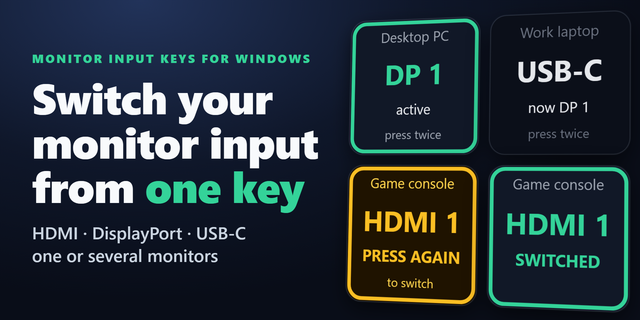
Input Switch / Cycle — VCP 0x60. Same MCCS filtering; Cycle walks a picked subset.
Volume Mute — VCP 0x8D (monitors with built-in speakers).
Power — VCP 0xD6, default Toggle (On ↔ Standby). The riskier Off / Off-soft values are flagged with ⚠ in the picker.
Display (7)
HDR Toggle — Windows Advanced Color on/off via the DisplayConfig API.
Topology — Win+P alternative: Extend / Duplicate / PC only / Second only.
Stay Awake — Presentation mode (system + display).
Force Display Sleep — SC_MONITORPOWER broadcast to put every attached display into low-power state.
Resolution — Switch resolution + refresh rate.
Refresh Rate — Quick-switch at current resolution. DXGI surfaces fractional rates (59.94 / 29.97 / 23.976 / 47.95 / 75.03) the legacy GDI enumeration omits.
Warmth Dial — Software color temperature 1500–12000K via SetDeviceGammaRamp; can dim below the panel's hardware minimum.
Window / cursor (4)
Window Send — Move the foreground window (or a pattern-matched specific window) to a chosen monitor and sub-rect. Prev/next relative monitor and toggle/restore supported.
Window Find — Bring the first window whose title or process name matches a pattern to the foreground.
Always On Top — Toggle HWND_TOPMOST on the foreground window.
Mouse Move — Snap the cursor to a chosen monitor, the foreground window centre, or a specific position.
Audio (4)
Audio Switch (Output) — Switch the system default playback endpoint via IPolicyConfig.
Audio Switch (Input) — Same for the default microphone.
Audio Cycle (Output / Input) — Cycle through a picked subset.
All four also support the separate Communications role (the "headset icon" Windows assigns to certain apps) independently of the Console / Multimedia default.
System (4)
Process Priority — Change OS scheduling priority of every running process whose exe name matches.
Power Plan — Switch the active Windows power plan.
Virtual Desktop — Next / prev / new / close / task view via Win+Ctrl shortcuts; reads the Explorer registry for desktop count so wrap-around works.
Scene — Capture and restore brightness, contrast, input, color preset, volume, and power across every connected monitor. Per-field opt-in, diff preview before save, per-app auto-trigger.
What sets it apart
MCCS-driven option filtering — only the inputs / presets the panel actually advertises, not a generic list.
Scene capture/restore with per-field opt-in and per-app auto-trigger — different display setups per app, fired automatically when the app comes to the foreground.
Fractional refresh rates (59.94 / 29.97 / 23.976 / 47.95 / 75.03) for video / film workflows that the legacy switcher hides.
Requirements
Windows 10 (2004+) or Windows 11
Stream Deck app 6.9+
DDC/CI enabled in the monitor's OSD (most modern monitors enable it by default)
HDR Toggle requires an HDR-capable display
All operations local — no internet access required
Privacy
No personal data is collected, transmitted, or stored. All operations are local to your Windows system. No telemetry, no analytics, no network access.
Fix for monitors not being detected.
Fixed
After updating to 1.0.2.0, the monitor list could stay empty and input lists could stop loading. This is fixed.
Version 1.0.2.1
Oct 13, 2026
Details
Type
Utilities
OS
Windows
Compatibility
Stream Deck 6.9 or later
Size
1.21 MB
Version
1.0.2.1
Language
English
Support
Profiles
No
Neo Infobar support
No
Dial support
Yes
You might also like


-thumbnail-optimized-9d3e3deb-447a-4904-99e0-f0aae47e1d9e.png)
-app-icon-optimized-98ff788f-ac05-4b68-994a-9fe5917c012e.png)
-thumbnail-optimized-69590aa2-3603-4ac7-9f90-3970ffbb245e.png)
-app-icon-optimized-c0c332d2-9cdf-4130-bb54-72bfccdae96e.png)