Monitoring
Monitor for Prusa
by Style-Idea
Overview
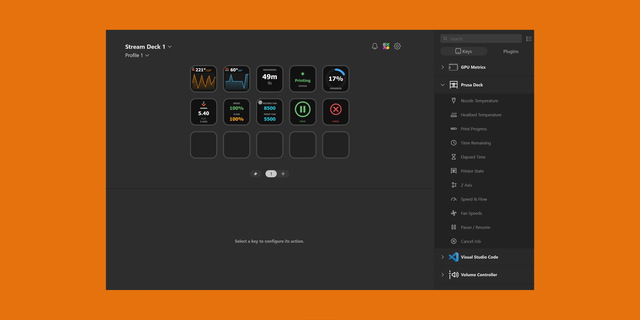
Monitor your Prusa printers from your Stream Deck — including several printers at once, with the live thumbnail of what's being printed.
Key features
Multi-printer support — manage several Prusa printers from a single Stream Deck. Each printer is configured once; all buttons share the same profiles.
Prusa INDX toolchanger support — tested on real hardware
Print thumbnail — displays the model currently being printed, directly on a key
Filament — shows the type of filament loaded (PLA, PETG…), following the active tool
Combined temperature view — nozzle and bed on a single key, turning green when each reaches its target
Also included
Live status — print progress, print phase (Heating, Preparing, Printing), printer state
Progress ring — big progress ring with the completion percentage, several colors and shapes
Nozzle and bed temperatures — with history graphs (line, area or bars)
Time remaining — estimated time left and finish time
Print progress — elapsed time and current Z height
Z height — current Z-axis position on its own key
Speed & Flow — with visual alerts when modified
Fan speeds — hotend and part cooling RPM
Nozzle diameter — shows the installed nozzle size
Print controls — pause, resume, stop (hold to confirm)
Optional printer name on each button — instantly see which machine a button refers to
Smart polling — buttons of the same printer share one connection
English and French interface
Compatible with
Prusa CORE One, CORE One INDX, MK4/S, MK3.9/3.5, XL*, MINI
Any Prusa printer with PrusaLink enabled (including Raspberry Pi setups for MK3/MK2.5)
*XL and INDX: nozzle temperature, flow, fans and filament show the currently active tool. The active tool number itself is not provided by PrusaLink.
Setup
Enter your printer's IP, username and password once. Digest authentication (recommended) or API key.
Prusa INDX support:
- Compatible with the Prusa CORE One INDX toolchanger, tested on real hardware
Speed & Flow shows "—" instead of 0% when no tool is loaded
New:
- New button - Filament: displays the type of filament loaded (PLA, PETG…)
New button - Z height: displays the current Z-axis height
New button - Print progress (ring): big progress ring with the completion percentage, with several colors and shapes to choose from
Improvements:
- "Live settings" button renamed "Speed & Flow", with a clearer description
Thumbnail button shows a "Loading…" state while the preview is being downloaded
Stop button hold confirmation is now 4 seconds, with a clearer full-screen countdown
Temperature buttons no longer show an empty "Target" line when heating is off
Pause/Stop buttons now correctly reflect an active print during a filament-runout pause
Printer name/display settings are no longer reset when you edit a printer's connection info
Switching a button to another printer no longer mixes values from both printers
Version 1.2
Oct 16, 2026
Details
Type
Monitoring
OS
Mac
Windows
Compatibility
Stream Deck 7.1 or later
Size
298.68 KB
Version
1.2
Language
English
French
Support
Profiles
No
Dial support
No
Neo Infobar support
No
You might also like